Features
Everything a driving school runs on
Six connected areas, one login. Every screen on this page is the real TUZO HQ, filled with demo data. Features in a higher package say which.
Included in every package
TUZO QuickBook
Post a free lesson time, choose who sees it, and the first learner to take it books it straight into your diary.
How TUZO QuickBook worksIncluded in Professional and Driving School
One Inbox
Learner and parent and guardian messages in one place, answered from TUZO HQ.
About One InboxIn private testing for iPhone
The TUZO HQ app
Your diary, learners, lesson records and payments on your phone, with arrivals recorded in one tap.
See the app
Diary and weekly planning
A diary that keeps up with your week
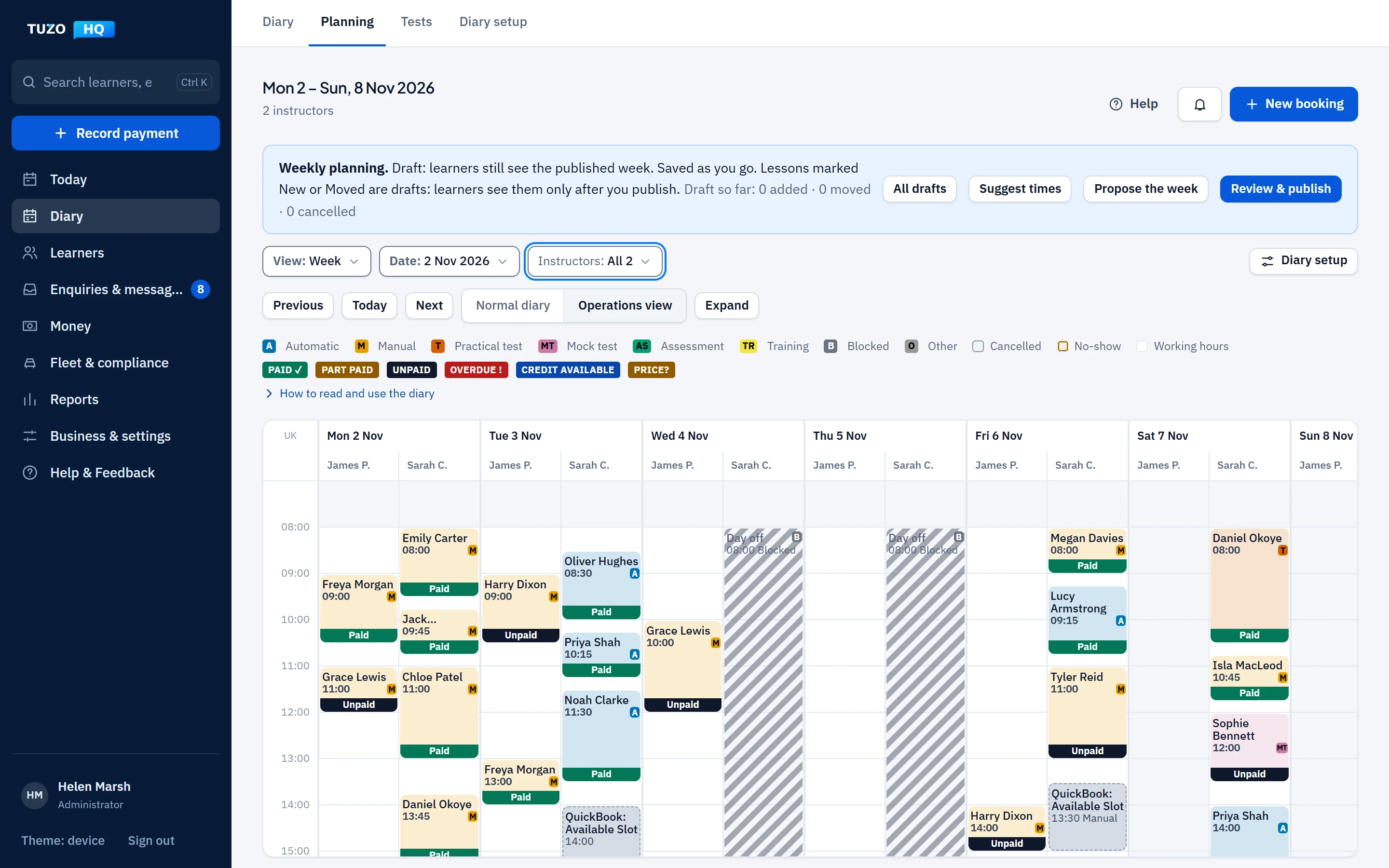
Book, move, swap and cancel lessons in seconds, with clashes stopped before they happen. Plan next week as a draft and publish it when it is right: learners are told once, not every time you change your mind.
Booking
- Lessons, mock tests, practical tests and private appointments
- Move, swap and cancel, with the reason kept
- Conflict checks for instructor, learner and vehicle
- Repeating weekly lessons
- Open TUZO QuickBook slots shown in the diary
Planning
- Plan a week as a draft and publish it once
- Learners told once when the week is published
- Suggested times from learners’ availability (Professional)
- A proposed whole week for every instructor (Professional)
Day to day
- Today page: lessons, tests and what needs doing
- Arrival and lesson completion recording
- Working hours, time off and availability
- Read-only calendar feeds for Apple, Google and Outlook calendars
Learners and progress
Every learner’s journey, in one record
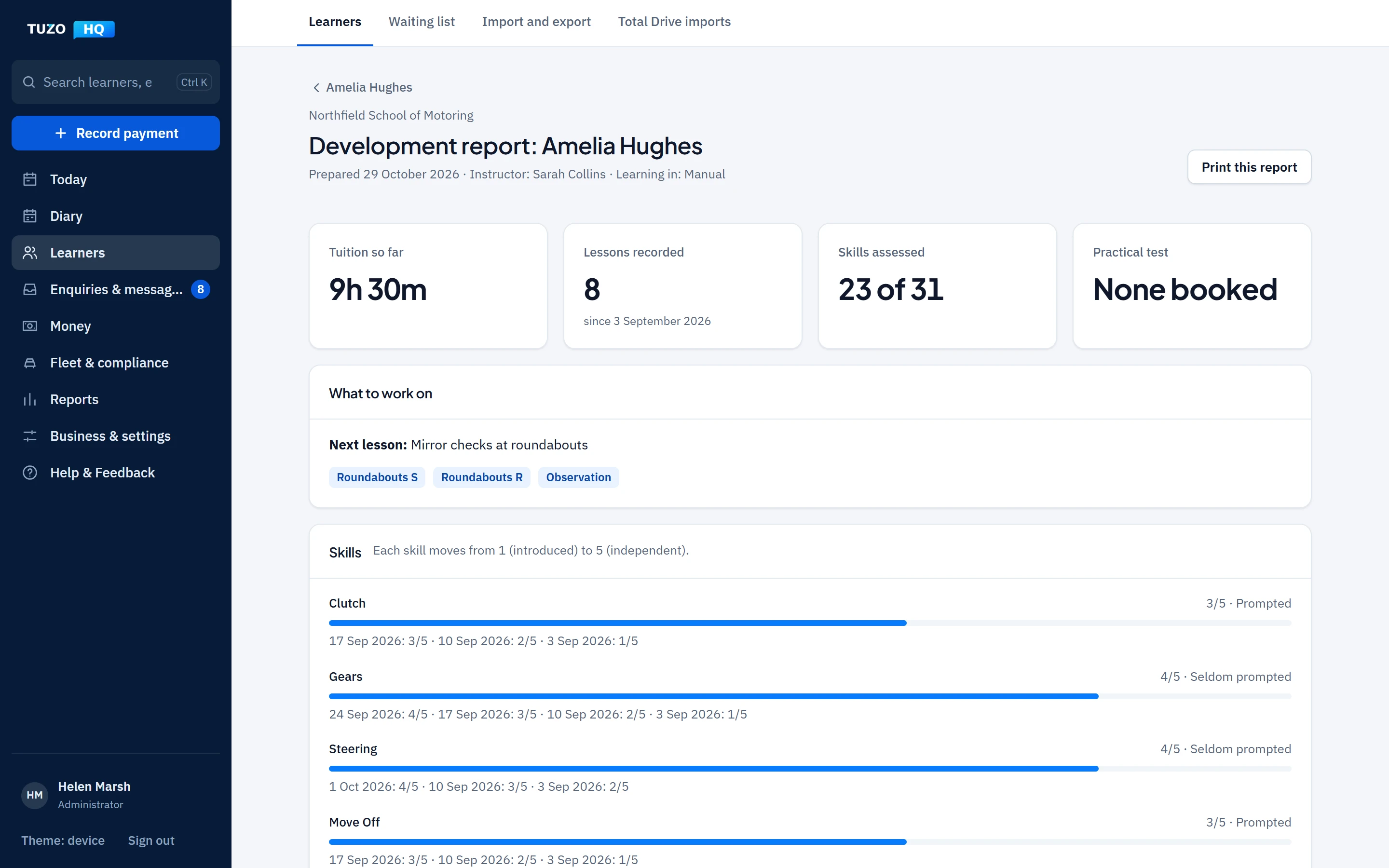
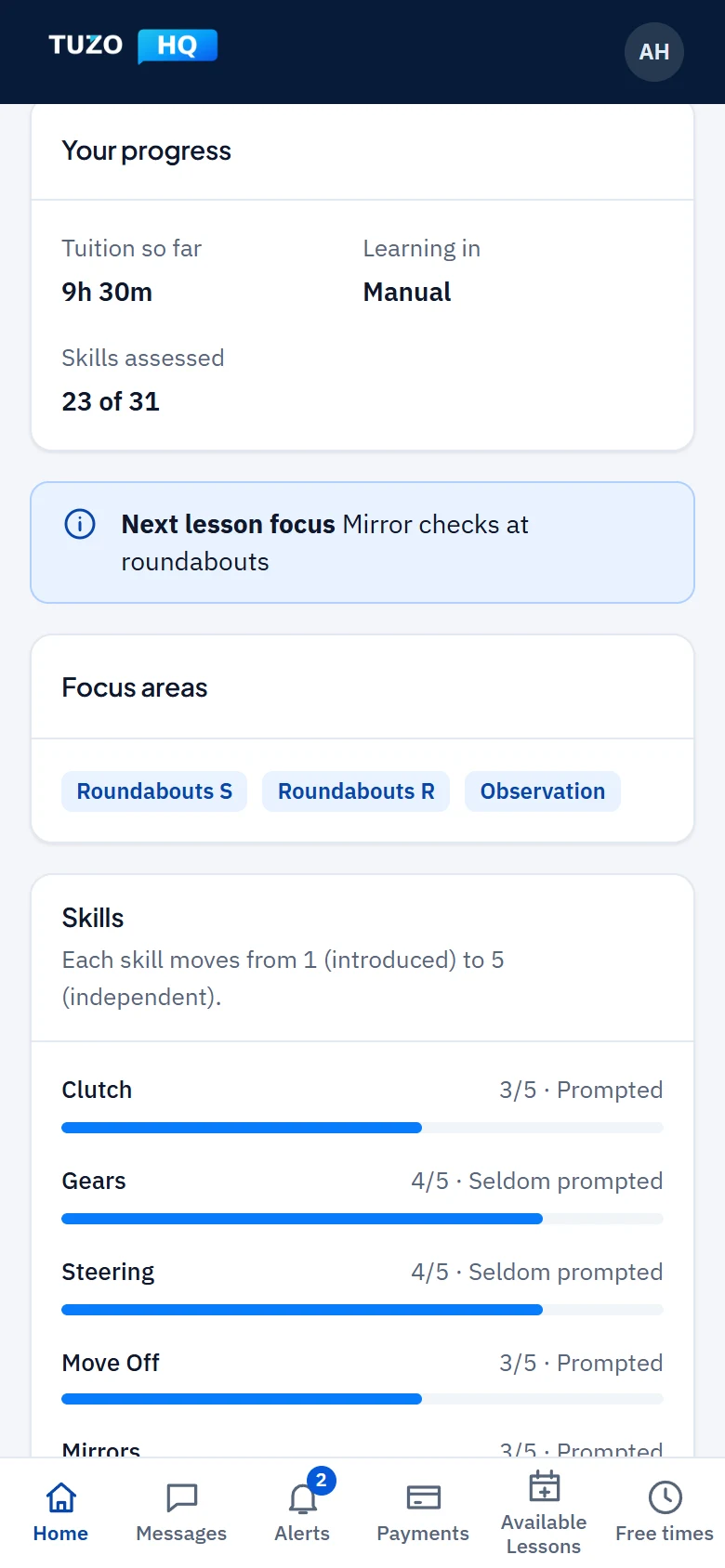
Contact details, lessons, tests, payments and progress together. Record each competency after a lesson and turn it into a development report learners and parents can follow.
Records
- Unlimited learners
- A timeline of contact, lessons, tests and payments
- Contact details stored encrypted
- Former learners kept, with restricted access
Progress
- Competencies scored lesson by lesson
- Development report and next-lesson focus
- Reflection questions after lessons
- Mock-test readiness and practical test results
Learners and parents
- A learner app in the browser, which can be added to a phone’s home screen
- Lessons, progress, payments, receipts and messages
- A separate sign-in for parents and guardians, for one or several learners
- Learners aged 18 or over decide whether a parent can see their record
Finance and payments
Know what is owed, paid and overdue
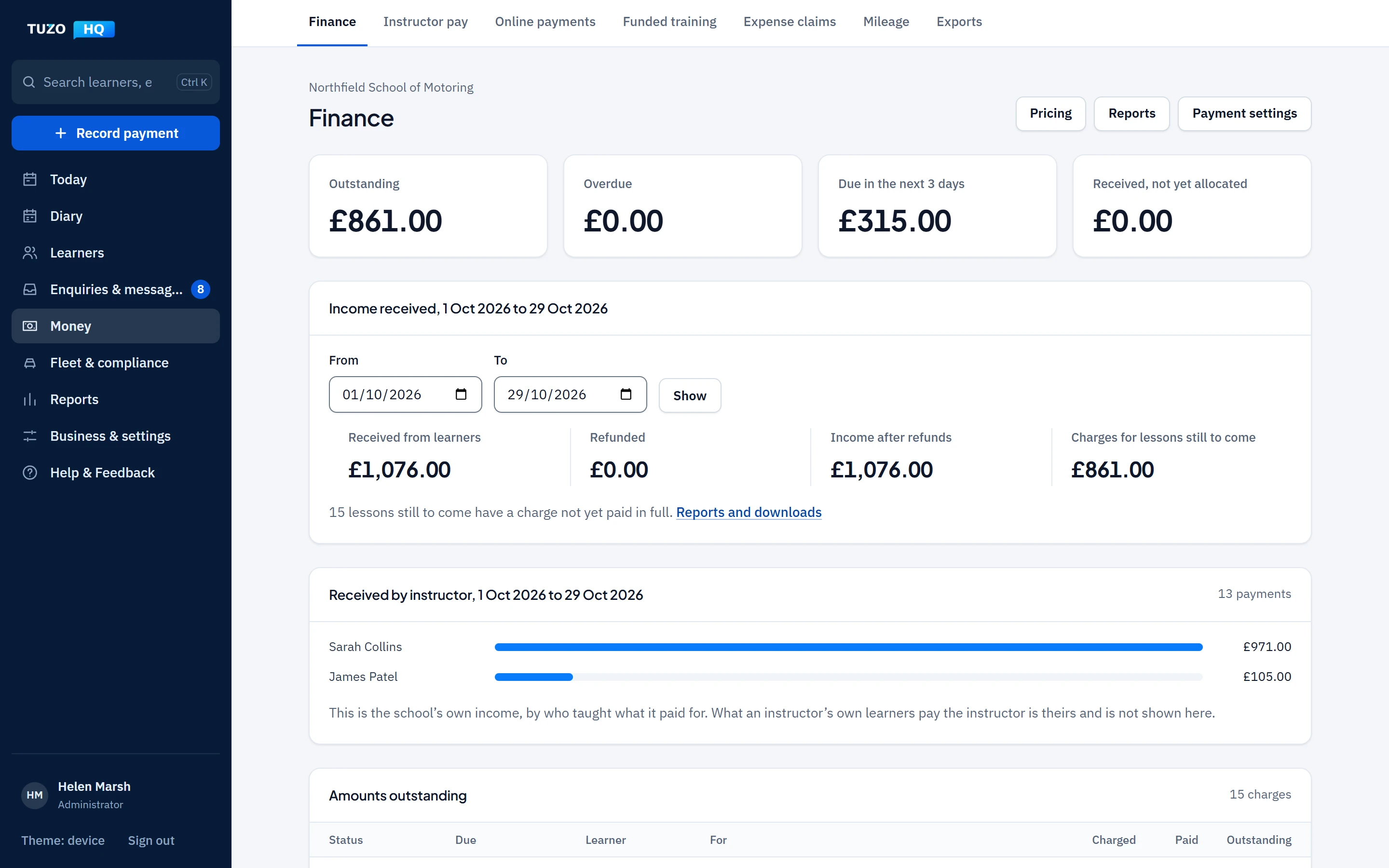
Charges are raised from lessons, payments are recorded and receipted, and balances stay up to date without a spreadsheet. Instructors keep their own earnings private, even from the school.
Money in
- Charges from lessons, with prices per learner if you need them
- Payments, allocations, refunds and receipts
- Outstanding and overdue balances
- Lesson and payment reminders by email
Money out
- Expense claims with receipts and approvals
- Mileage with its value
- Instructor pay
- Vehicle costs in the right account
Reports
- Income, expenses and outstanding reports
- Downloads as spreadsheets (CSV)
- Income by instructor and school revenue (Professional)
- Each instructor’s own money kept apart from the school’s
Enquiries and CRM
Turn more enquiries into learners
Every enquiry in one list, with follow-ups that do not slip. Keep a waiting list in order, and turn an enquiry into a learner without typing their details again.
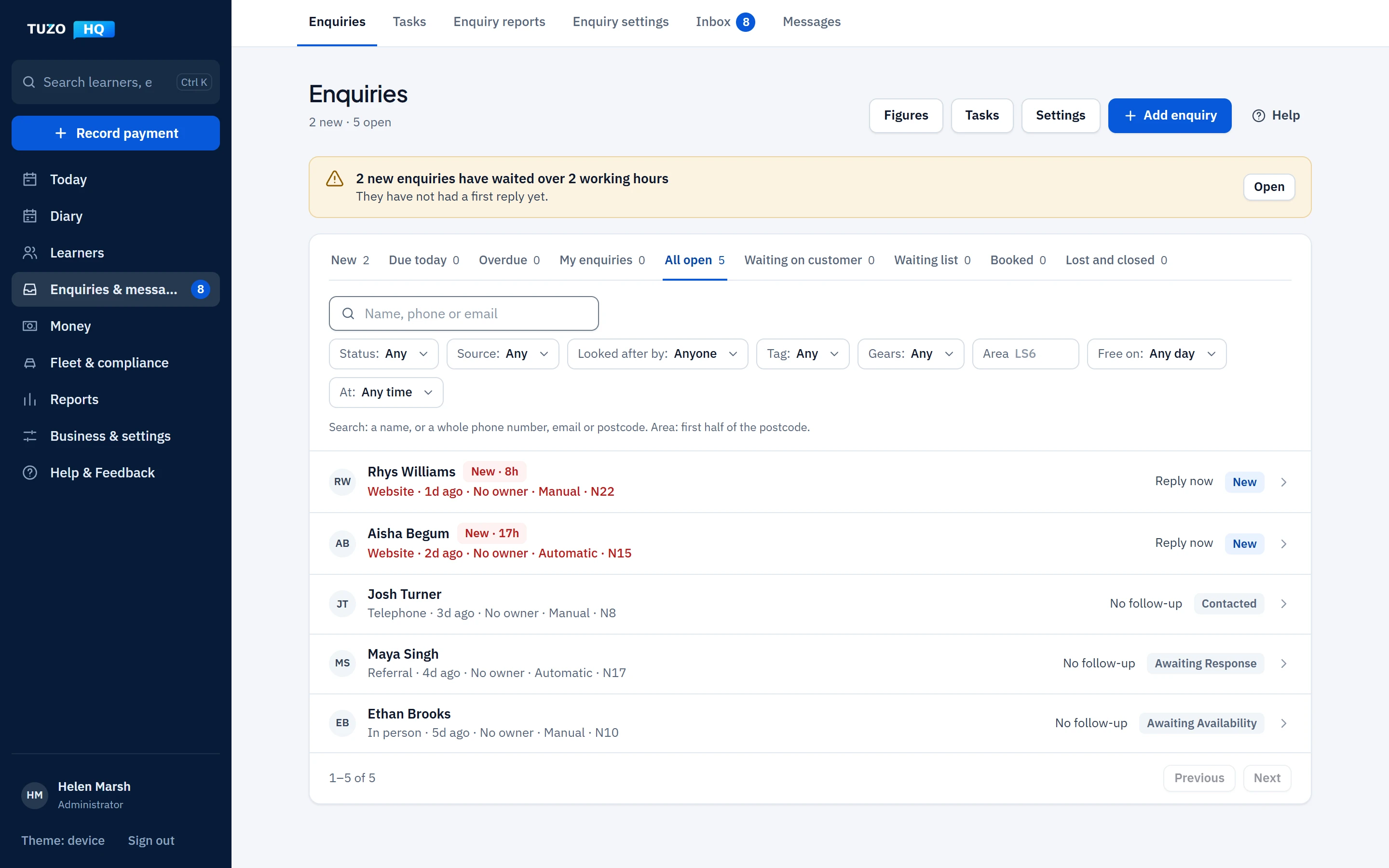
Capture
- A website form and a shareable link
- Manual entry for calls and walk-ins
- Sources and campaign tracking
- New-enquiry alerts and a daily digest
Follow up
- Statuses, tasks and tags
- Reminders when a follow-up is due or overdue
- Duplicate checks
- A waiting list with positions
Convert
- Onboarding by secure link
- Terms and prices confirmed by the customer
- A parent or guardian for under-18s
- The enquiry becomes the learner record
Communications
Keep everyone in the loop, automatically
Message learners and parents from their record, answer learner and parent messages from One Inbox (Professional and Driving School), and let TUZO HQ send the routine notices: lesson changes, published weeks and payment reminders, by email and app notification.
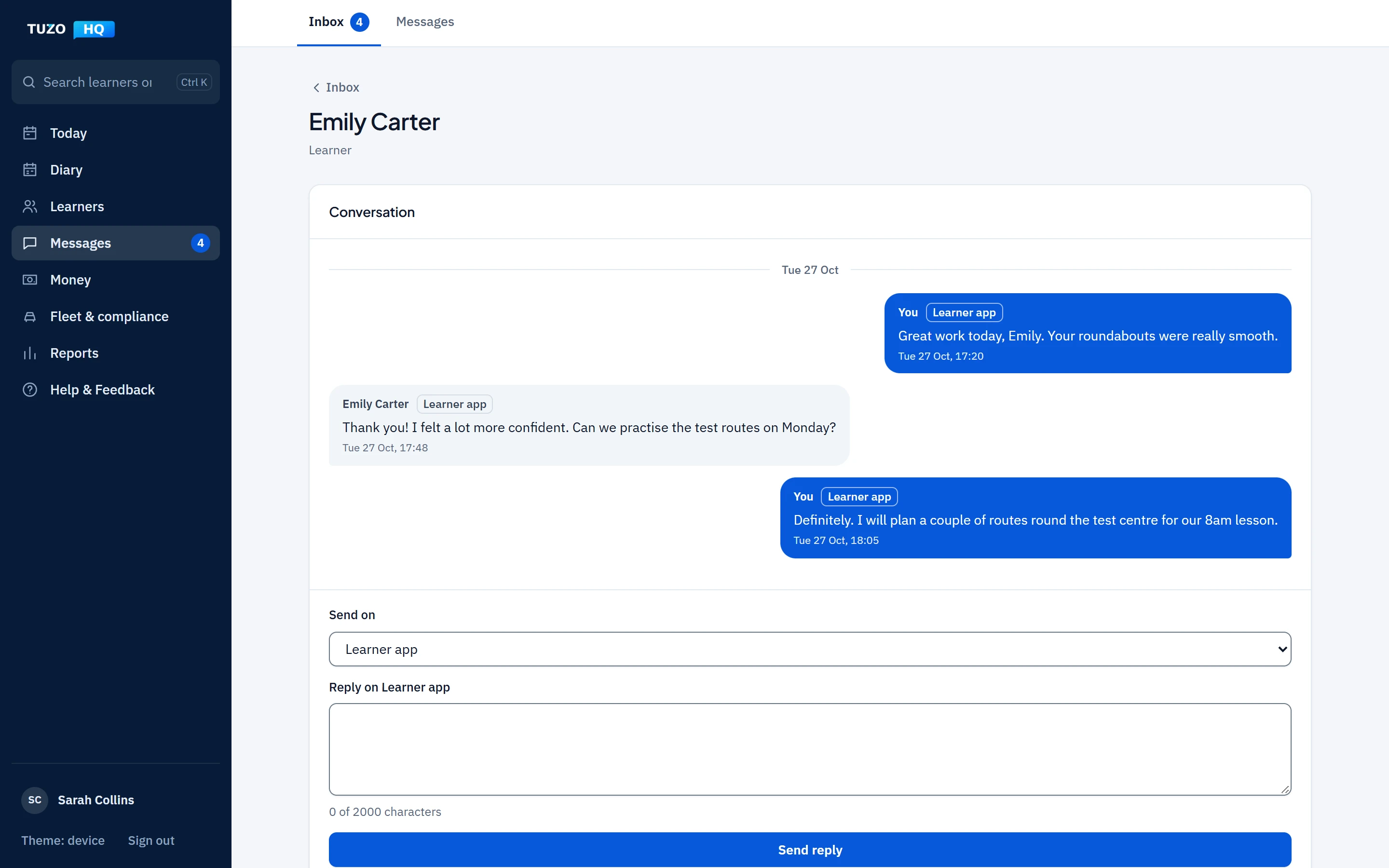
Messages
- Two-way messages with each learner
- Parents and guardians message the school
- Messages kept as part of the record
- Unread counts for staff
One Inbox
- Learner messages
- Parent and guardian messages
- Replies straight from TUZO HQ, with unread counts
Notices
- Lesson booked, moved or cancelled
- A published week, sent once
- Payment requests and reminders
- Branded emails in your school’s name
Coming soonNot yet available
- WhatsApp, Messenger and Instagram messages in One Inbox
- Text messages and missed calls in One Inbox (they will use SMS Credits)
- Automated follow-up sequences
Driving school management
Run the whole school from one place
Give every member of staff exactly the access their job needs, with presets for the front desk, bookings, operations and accounts. Keep vehicles, badges and CPD in date with reminders.
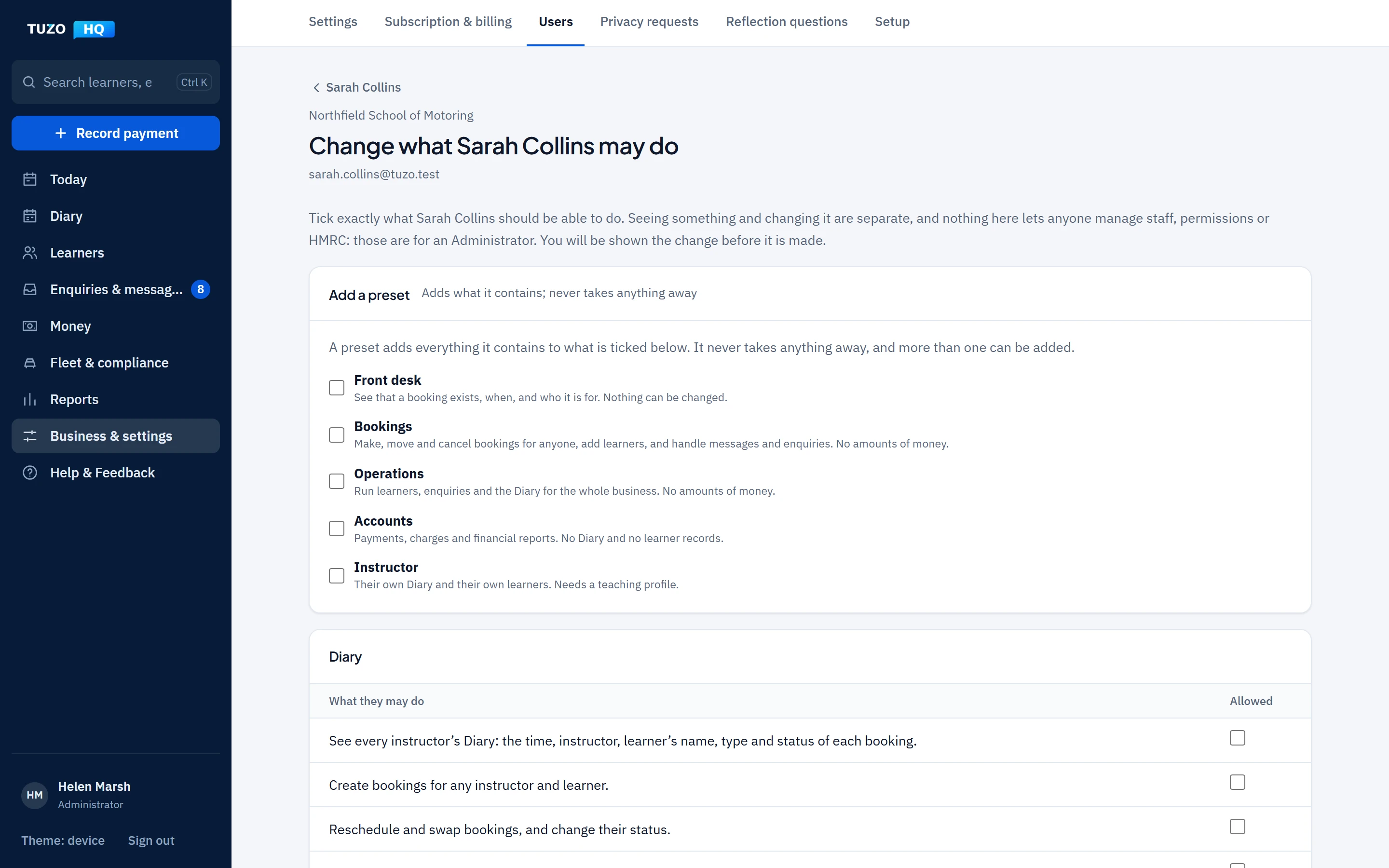
Team
- Several instructors in one school (Driving School)
- Allocating learners to instructors
- Staff permissions and presets
- Access that ends on a date you set
Vehicles and compliance
- MOT, tax, insurance and service dates with reminders
- Service, repair, fuel and mileage history
- Shared vehicles allocated without clashes (Driving School)
- Badge expiry, standards checks, CPD and private documents
Oversight
- Dashboard and management reports
- Diary utilisation (Professional)
- School-wide reports and branding (Driving School)
- Each school sees only its own records
Learner progress
Every lesson starts where the last one finished
Agree what to work on before the learner leaves, and it is waiting for you when the next lesson begins. No notebook, no searching through old notes.
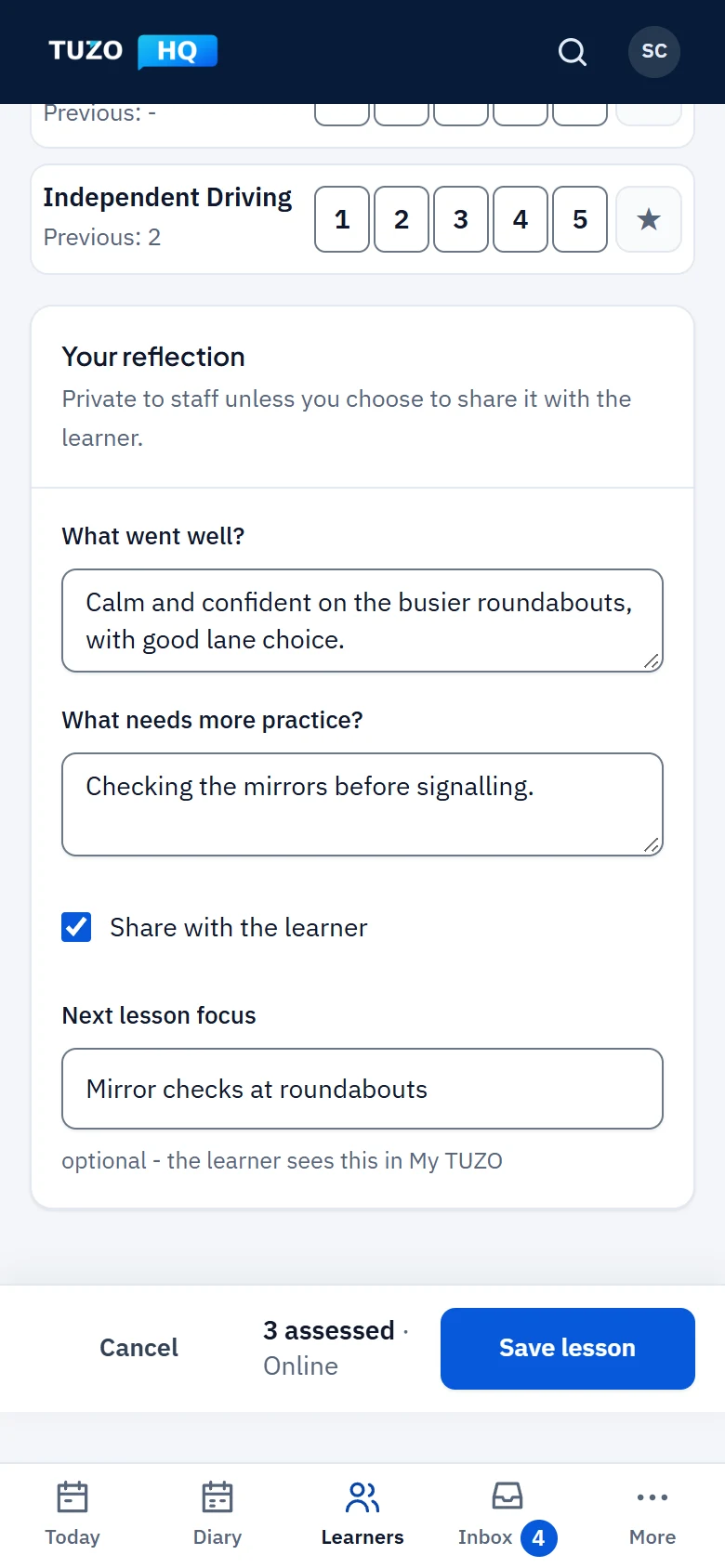
1End of the lesson
Agree what comes next
In the lesson review, note what went well and what needs more practice, star the skills to work on and write the next lesson focus together. The focus is saved to the learner’s record, and the learner sees it in their own app.
- What went well and what needs more practice, in your own words
- Skills starred to work on next time
- A written next lesson focus the learner can see
2Next lesson
Open the lesson, see the plan
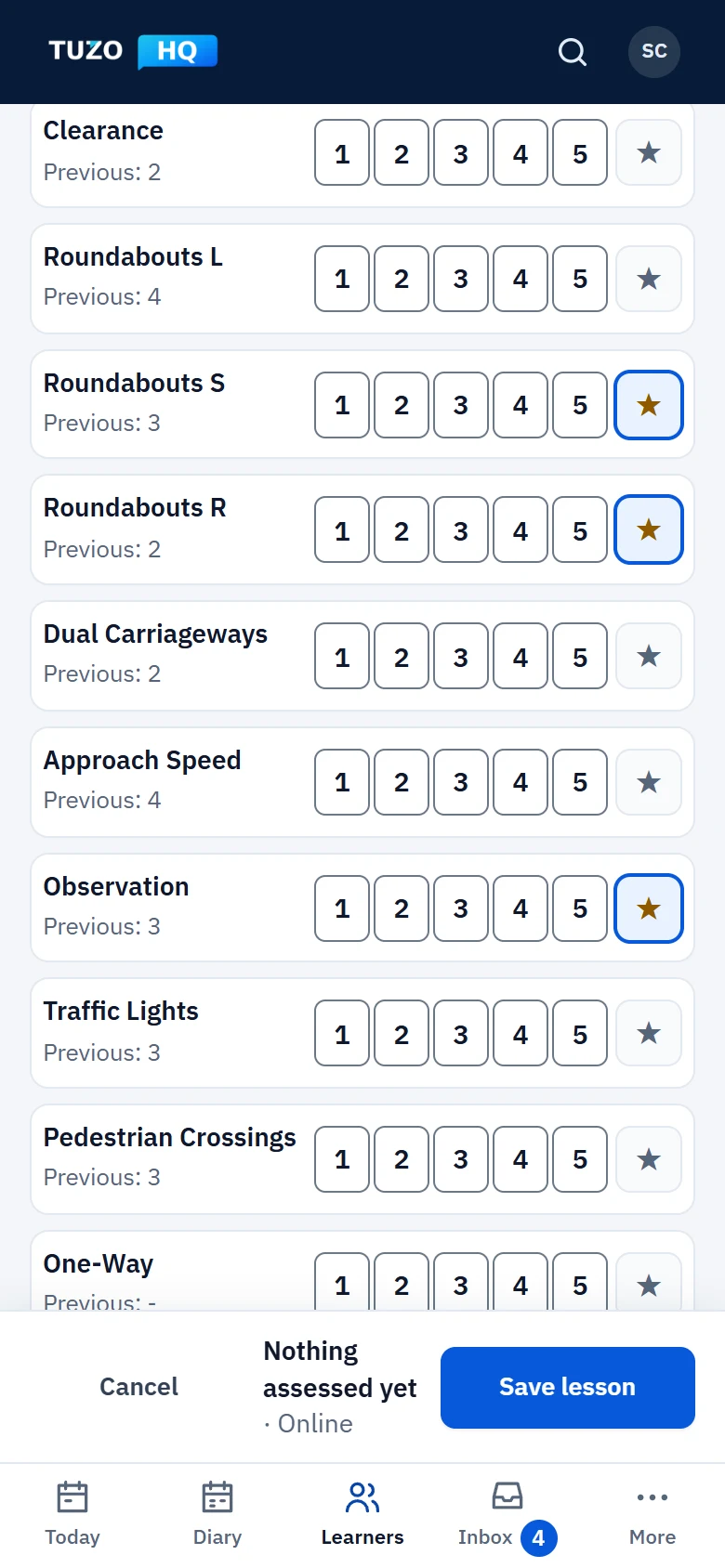
The agreed focus is already there when you open the next lesson’s review: the starred skills with their previous scores, and the focus you wrote together.
- Starred skills carried over
- Each skill’s previous score beside it
- The written focus ready to update
3At pickup
Tap ARRIVED
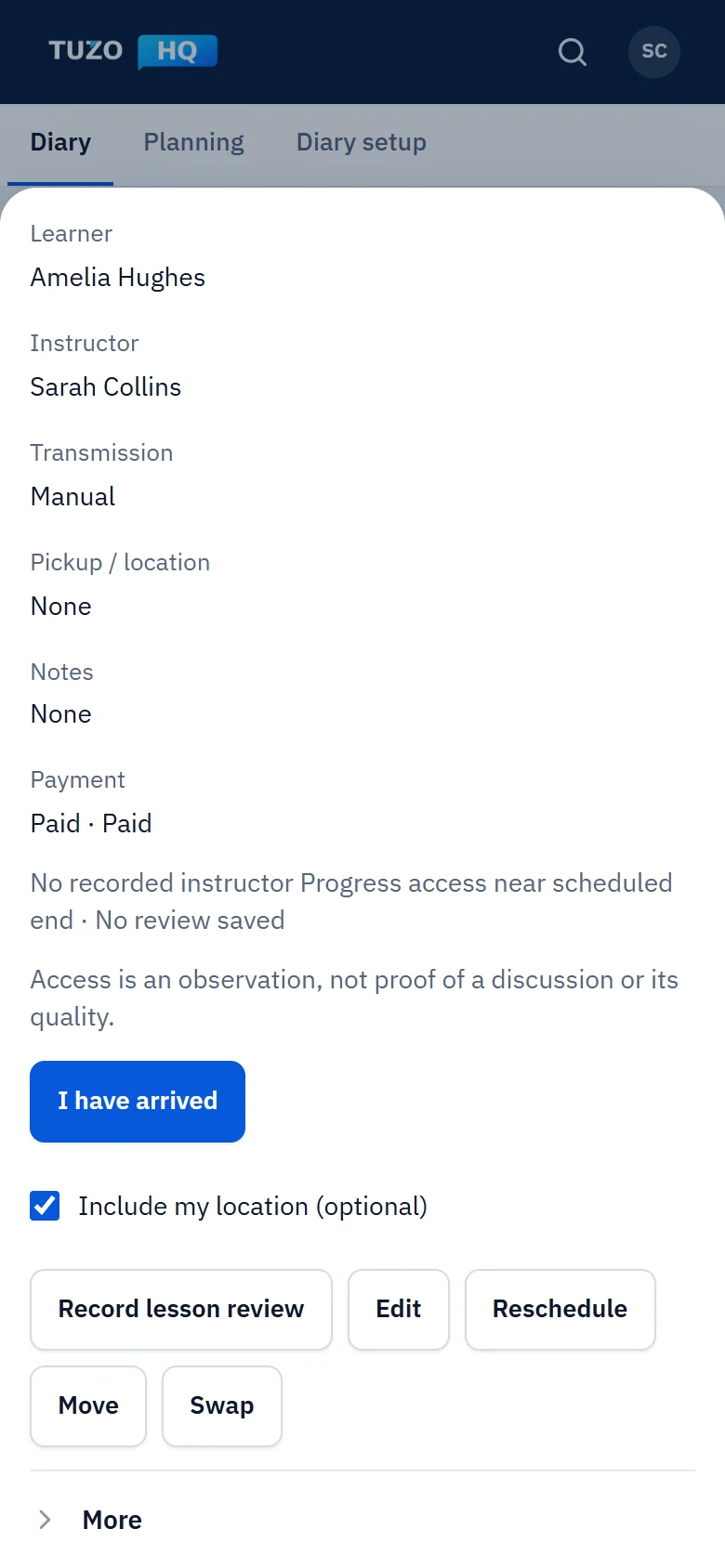
One tap records when you arrived. If you choose, and your phone allows it, a one-time location is attached as supporting evidence.
- Arrival time recorded by the server
- Recorded once and kept as it was; a later note sits beside it, never over it
- Location only with permission, seen only by authorised staff, never by learners or parents
4After the lesson
Progress updates itself
Score the competencies covered, add your reflections and agree the next focus. The development report and the learner’s own progress update straight away.
- Competencies scored 1 to 5
- Reflections, private unless you share them
- Development report updated
Security and privacy
Safe with your learners’ data and your money
Each school’s data kept apart
Every record belongs to one school, and the separation is enforced by the server, not just hidden on screen.
Access by role
Staff see only what their permissions allow. Instructors’ own earnings stay private, even from the school.
Two-step sign-in
Staff confirm each new sign-in with a code by email or an authenticator app.
Encrypted contact details
Learners’ and enquirers’ contact details are stored encrypted.
Direct Debit through GoCardless
Your TUZO HQ subscription is paid by Direct Debit through GoCardless. No card details are taken.
Built for DVSA tests
Practical and mock tests, DL25 faults, ADI and PDI badges, standards checks and CPD.