Skip to content

TUZO HQ is live

Run your driving school from one place

Manage diaries, enquiries, payments and learner progress in one place, with an optional AI Receptionist.

No payment details to start. Nothing is charged unless you choose a package.

Available now on the Apple App Store for iPhone.

DesktopTabletPhoneWorks on desktop, tablet and phone

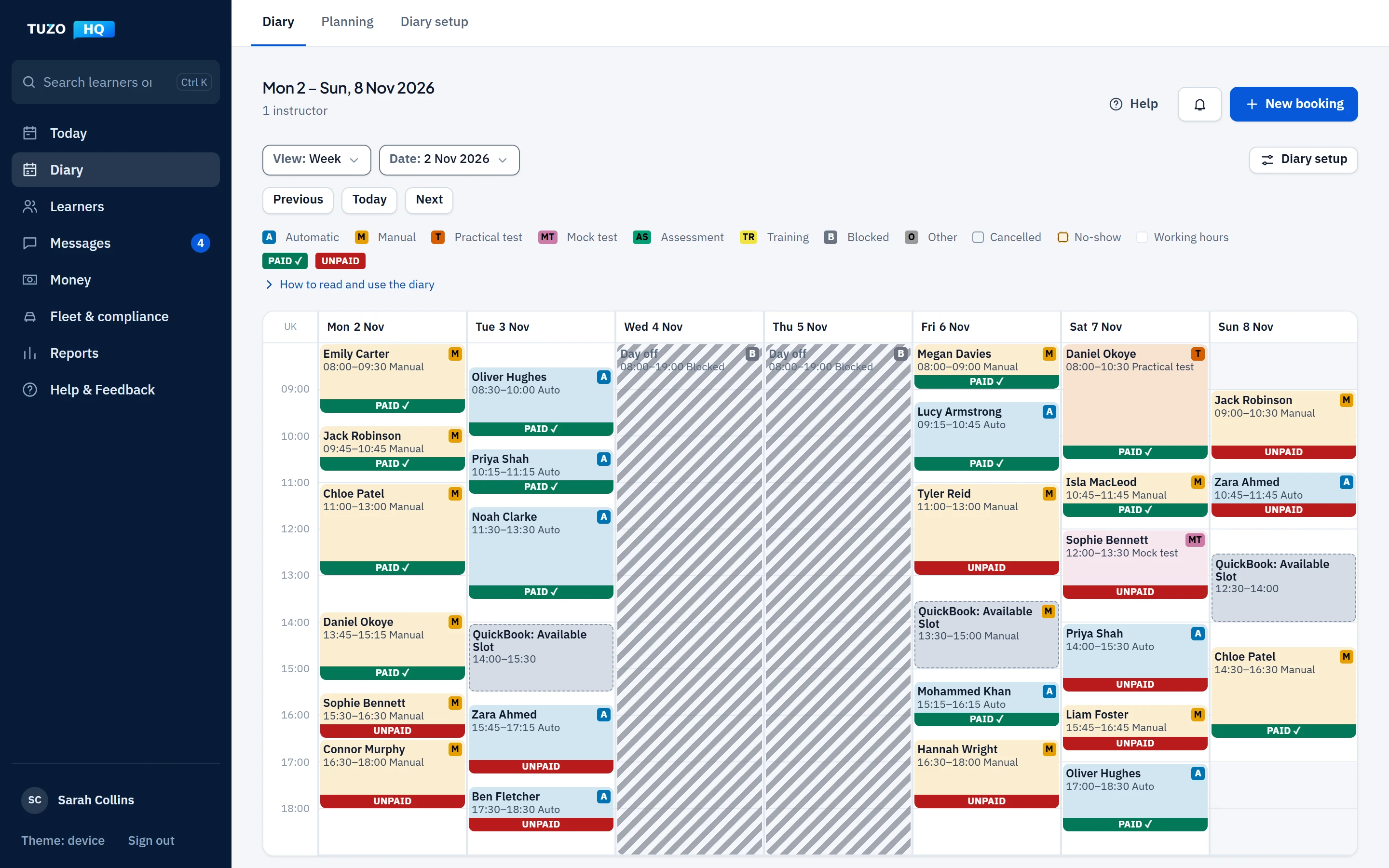
The TUZO HQ diary for one instructor’s week: manual and automatic lessons marked paid or unpaid, days off, and three grey QuickBook: Available Slot blocks showing free lesson times.
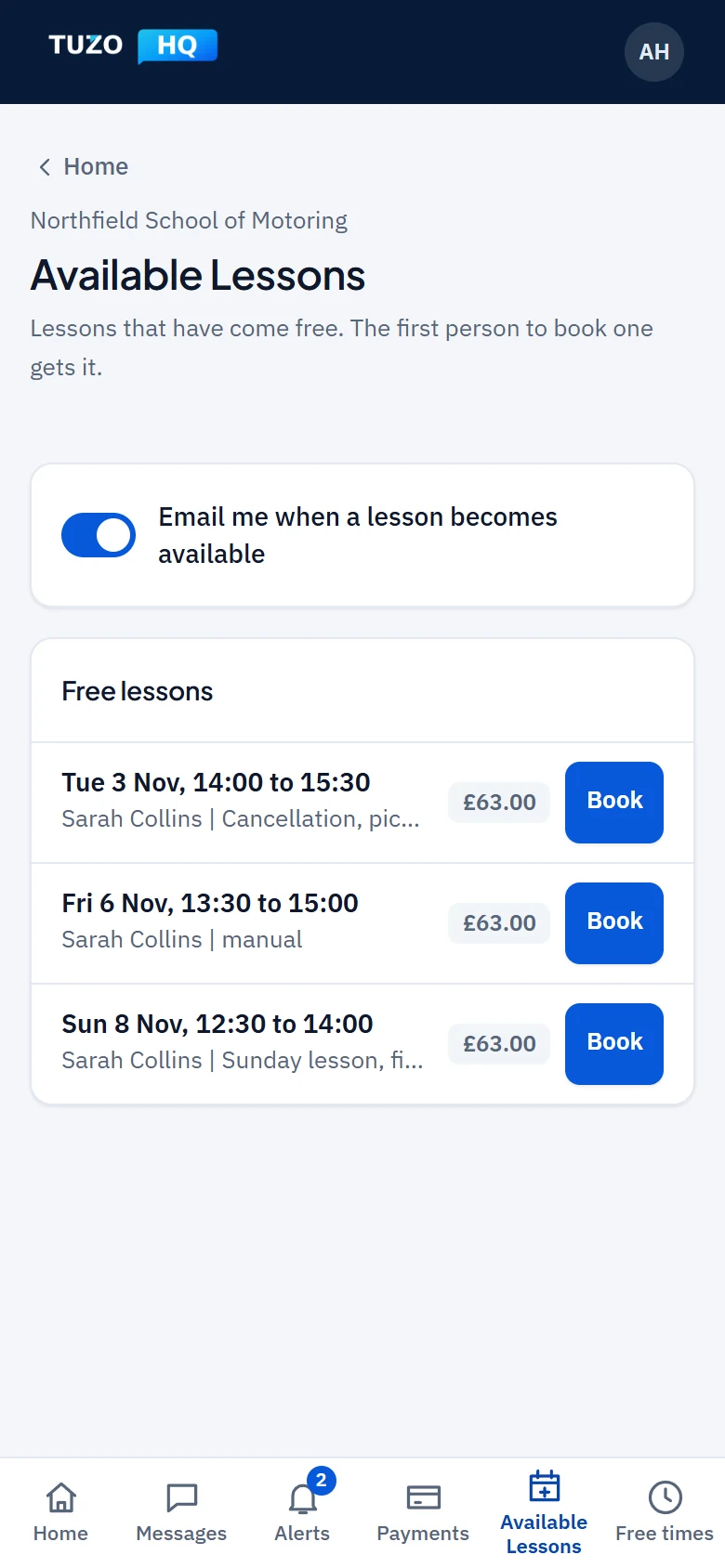
A learner’s Available Lessons screen on a phone, listing free lesson times with the day, time, instructor, gearbox, note and price.

Launch offer: save 25% on your first 6 monthly payments, or 40% on your first year when you pay annually upfront. Register by 14 February 2027.

The TUZO HQ app

Your whole working day, in your pocket

See your diary, open a booking, check a learner’s progress and record your arrival, all from your phone between lessons.

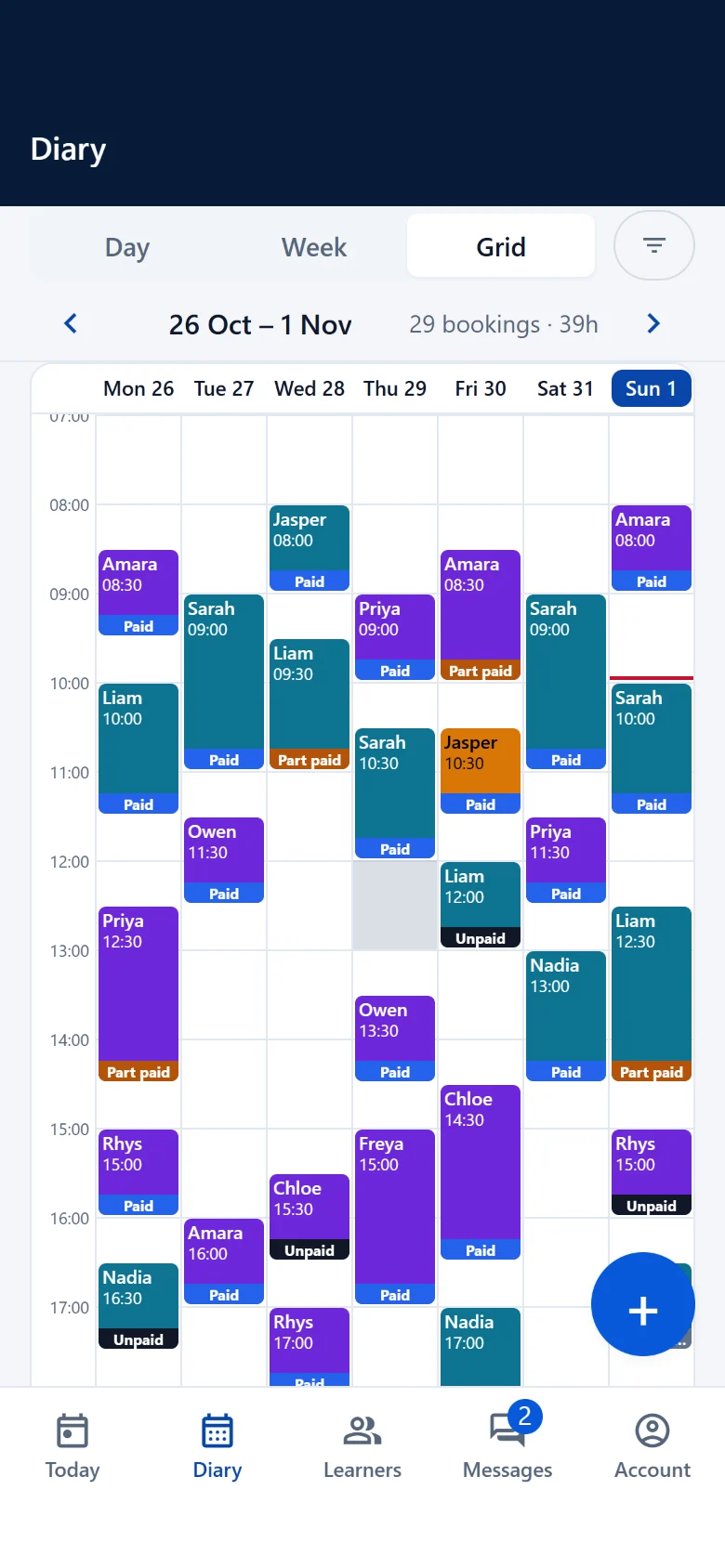
Demonstration data for instructor John Smith of Northfield School of Motoring. The diary in the TUZO HQ app as a grid of one week, with coloured lesson blocks for each learner and a strip on each showing Paid, Part paid or Unpaid.
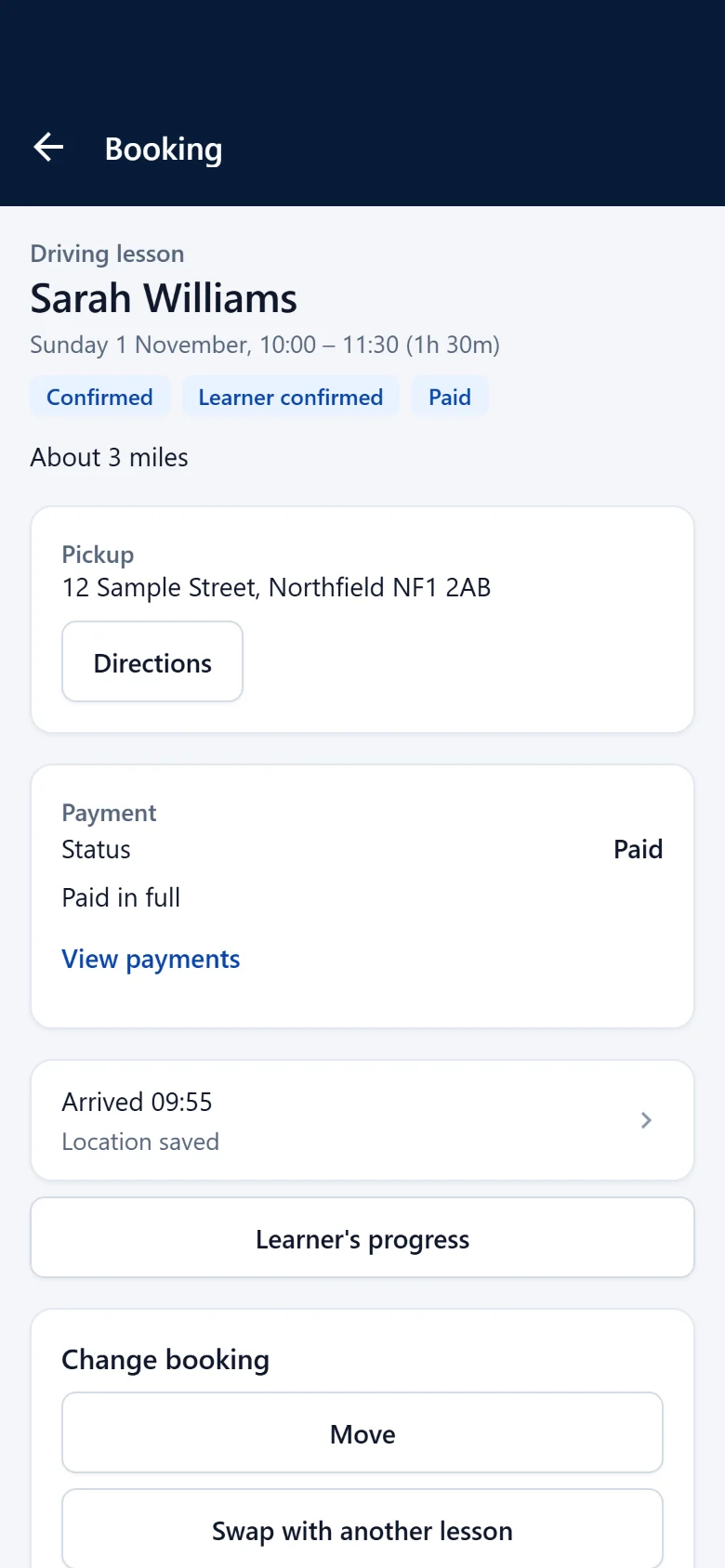
Demonstration data for instructor John Smith of Northfield School of Motoring. The booking details of the lesson with Sarah Williams, 10:00 to 11:30, in the TUZO HQ app, with the pickup, the payment marked Paid, the arrival at 09:55 and the ways to change the booking.
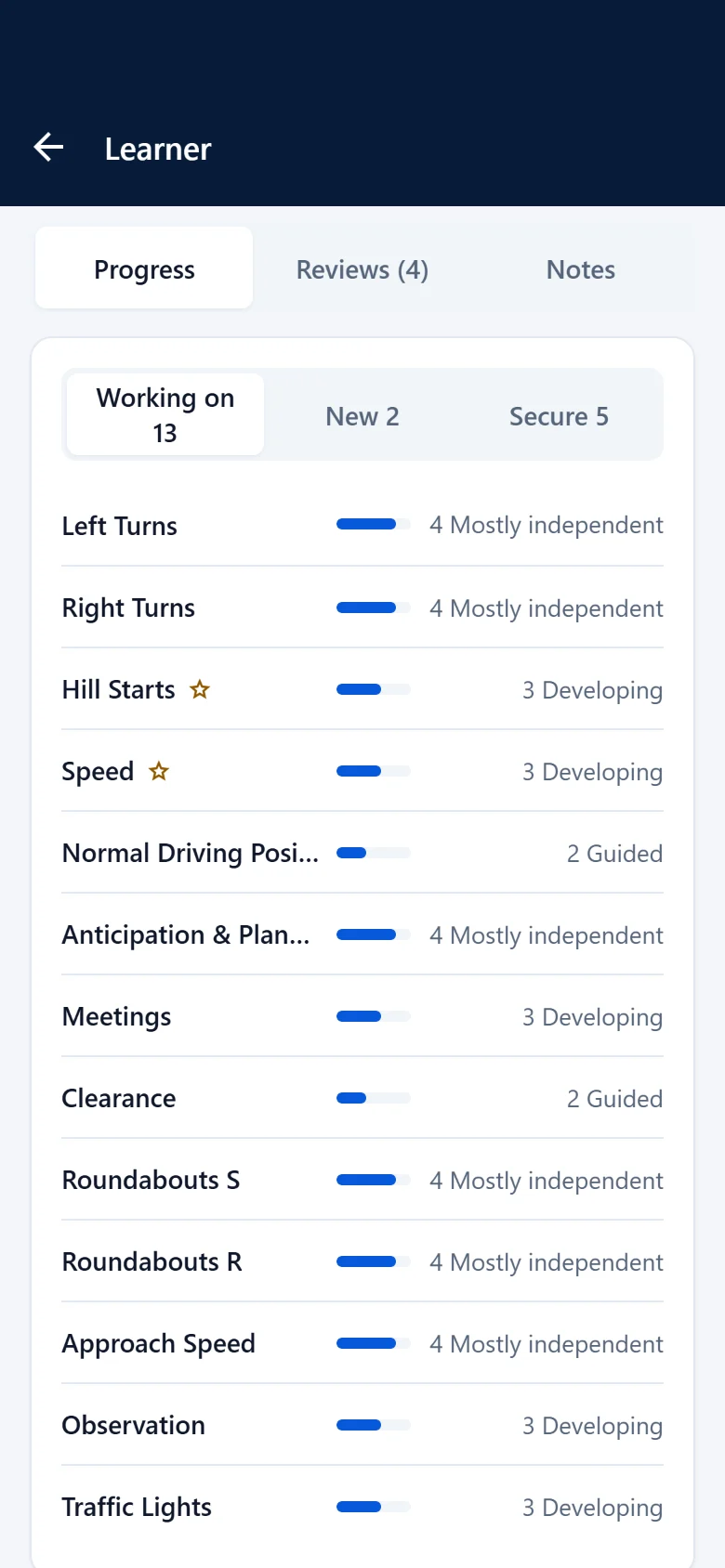
Demonstration data for instructor John Smith of Northfield School of Motoring. The progress of learner Sarah Williams in the TUZO HQ app, with the score for each skill.
  • Diary and lesson management

    See the day and week, and open any booking.

  • GPS-recorded arrivals

    One tap when you arrive for a lesson.

  • Learner progress tracking

    See how each learner is getting on.

  • Lesson reviews

    Record how a lesson went while it is fresh.

  • Payments and tuition records

    Know what has been paid and what is due.

  • Instructor communications

    Message your learners from the app.

  • Professional record-keeping

    Lessons and hours kept in one place.

  • Website and app working together

    Change one and the other stays up to date.

See the app

Available now on the Apple App Store for iPhone.

Every Arrival. Professionally Recorded.

Punctuality matters. TUZO HQ makes it easy to demonstrate.

With one tap of “I Have Arrived”, TUZO HQ records your arrival time, date and GPS location, linking everything directly to your learner’s scheduled lesson.

A clear, accurate record of your professional commitment, available whenever you need it.

One tap. GPS recorded. Professionally documented.

Your location is recorded with your phone’s permission, once, when you tap. It is never tracked during the day, and is seen only by authorised staff, never by learners or parents.

DVSA’s revised code of practice for driving instructors, due to be introduced between late 2026 and early 2027, says instructors should keep accurate records of lessons completed and hours delivered. Read the code on GOV.UK

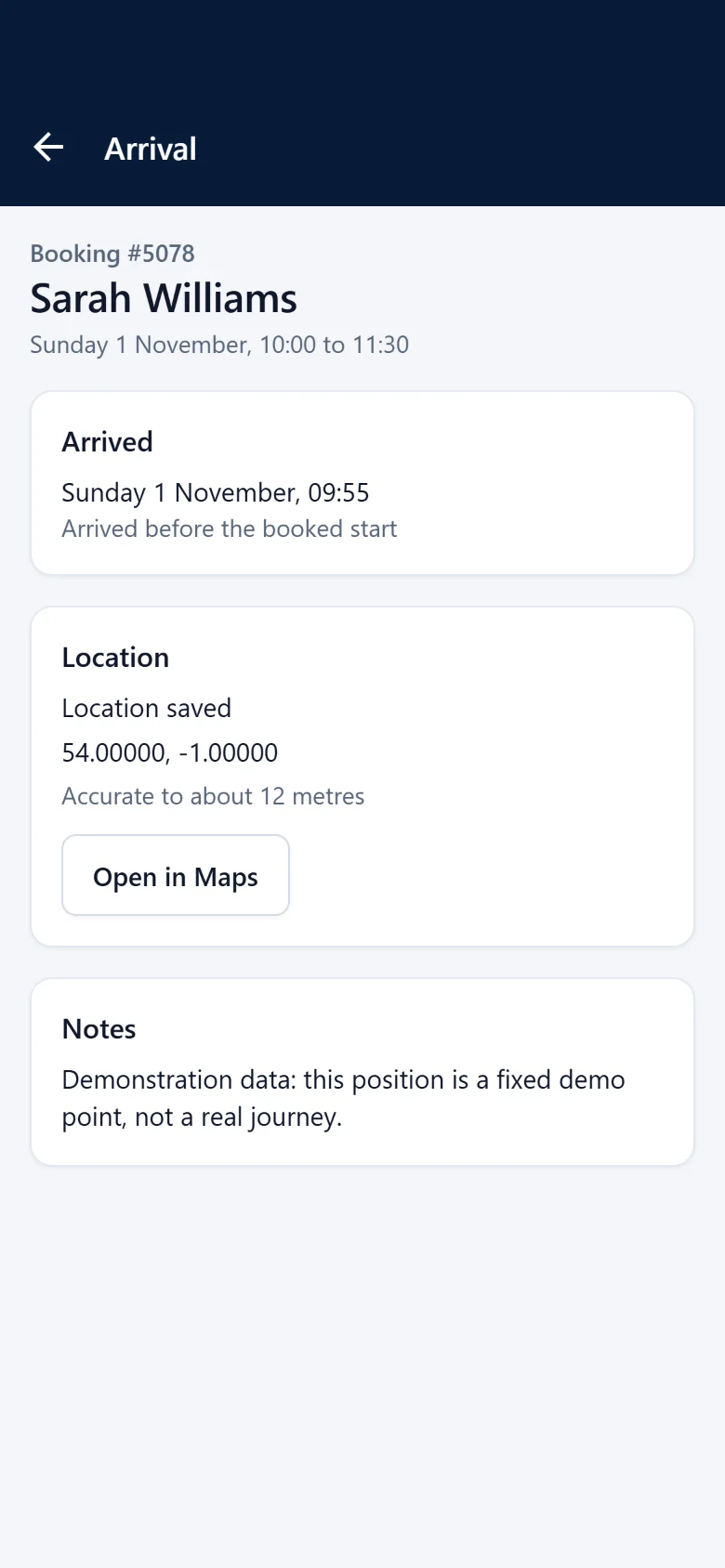
Demonstration data for instructor John Smith of Northfield School of Motoring. The arrival record in the TUZO HQ app: the lesson with Sarah Williams, 10:00 to 11:30, arrived at 09:55, before the booked start, with a saved location and accuracy. The arrival and its location are demonstration data.
Demonstration data for instructor John Smith of Northfield School of Motoring. The booking details of the lesson with Sarah Williams, 10:00 to 11:30, in the TUZO HQ app, with the pickup, the payment marked Paid, the arrival at 09:55 and the ways to change the booking.
Scheduled lesson
10:00 to 11:30
Recorded arrival
09:55
Arrived
5 minutes before the lesson

Example with fictional demonstration data and a simulated location.

Included in every package

TUZO QuickBook

Turn a free lesson time into a booked lesson

A learner cancels, or a day has space in it. Post the time, choose who sees it, and the first learner to take it books it straight into your diary.

  • Post a free time of 30, 45, 60, 90, 120 or 180 minutes
  • Choose who sees it: all your learners, your waiting list or chosen learners
  • Limit it by distance from a postcode and by gearbox if you want to
  • Learners who have opted in are emailed, and take it first come, first served

How TUZO QuickBook works

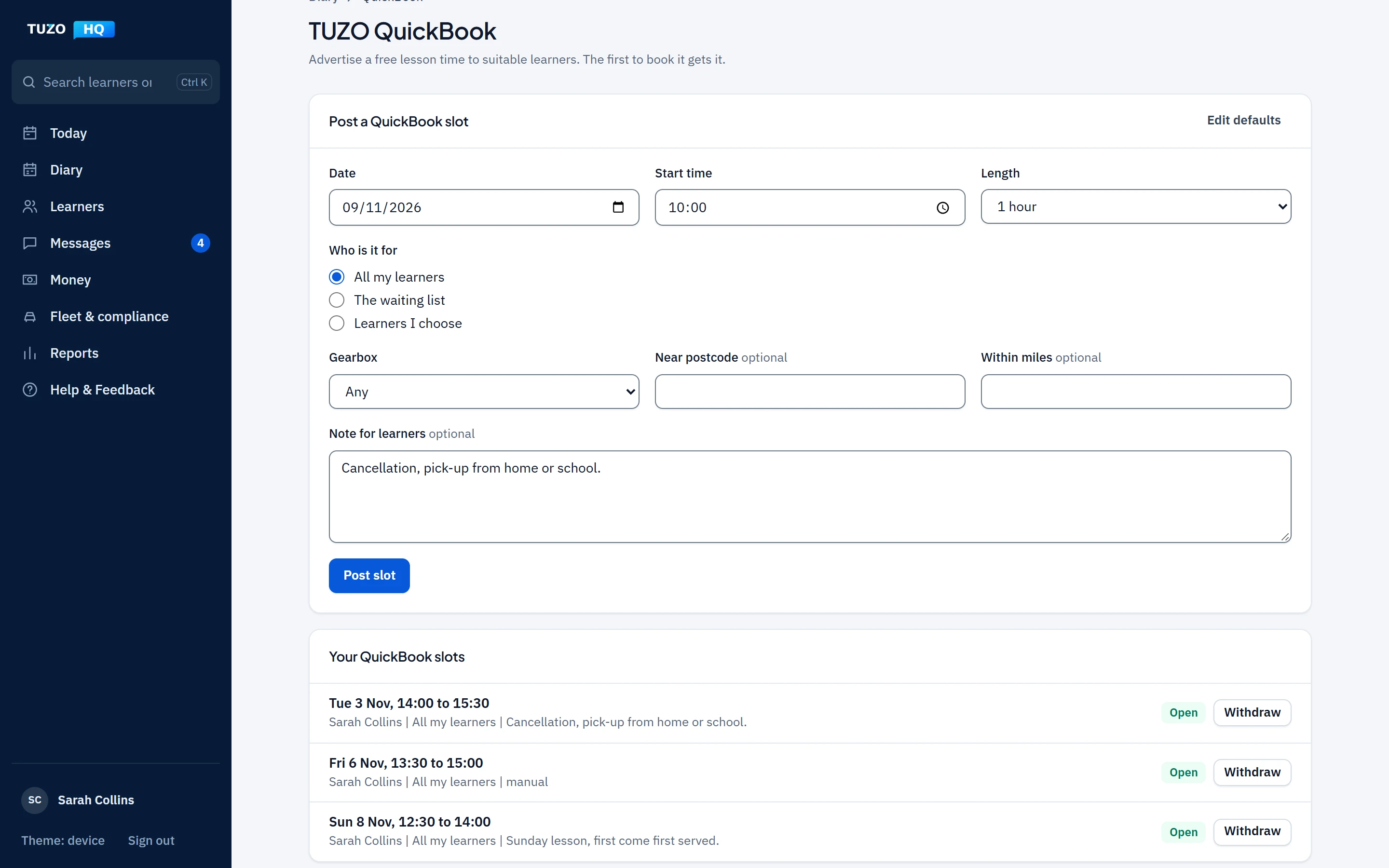
The instructor’s TUZO QuickBook page in TUZO HQ, with a free lesson slot being posted and the open slots listed below it.
A learner’s Available Lessons screen on a phone, listing free lesson times with the day, time, instructor, gearbox, note and price.

Included in Professional and Driving School

One Inbox

Every learner and parent conversation in one place

Reply to learners, parents and guardians from TUZO HQ, with unread counts so nothing waits unseen.

Available now

  • Learner messages
  • Parent and guardian messages

Coming soon

  • WhatsApp, Messenger and Instagram, including new enquiries
  • Text messages and missed calls

About One Inbox

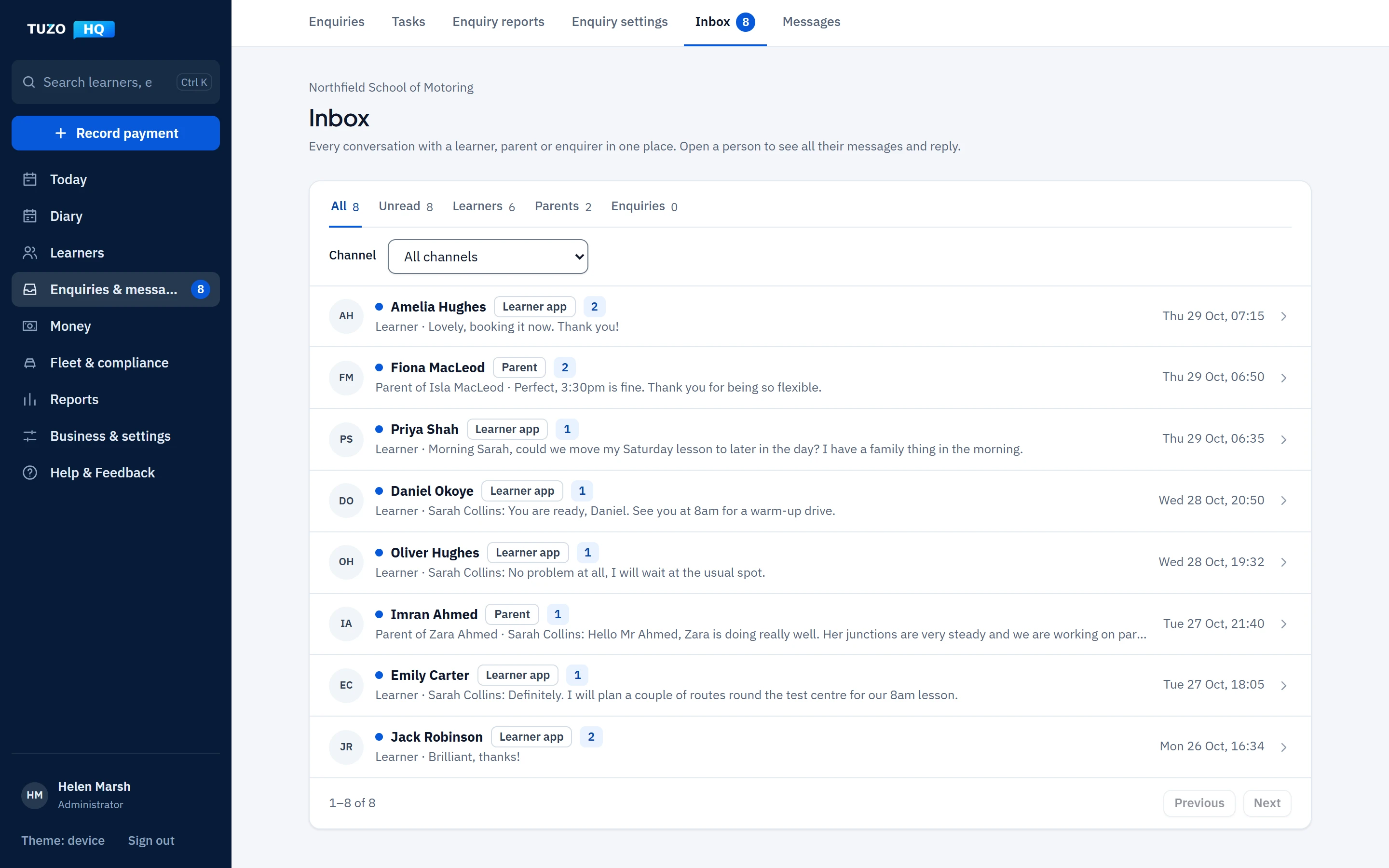
The One Inbox list in TUZO HQ for a demo school: tabs for All, Unread, Learners, Parents and Enquiries, and eight conversations, six with learners and two with parents, each showing the latest message and an unread count.

Texts and calls

AI Receptionist

An extra pair of hands while you teach

Our optional AI Receptionist answers calls you miss, helping your school stay responsive while you focus on your pupils.

£30.00 a month100 credits included each month

  • Can ring your mobile first, and answers if nobody picks up
  • Takes the caller’s details and can offer free lesson times when you allow it
  • Creates booking requests for you to confirm, never booking by itself
  • Keeps a summary and transcript of each call in TUZO HQ

Additional credits are bought separately.

Paid each month by the Direct Debit you set up for your subscription.

Optional add-on, not included in any package

About the AI Receptionist
Exclusive introductory offer

25% off your first 6 monthly payments

Or 40% off your first year when you pay annually upfront. Register by 14 February 2027 and you keep the offer through your free trial. Standard prices apply after the discounted period.

  • Starter£14.99£11.24a month for your first 6 payments
  • Professional£20.99£15.74a month for your first 6 payments
  • Driving School£24.99£18.74a month for your first 6 payments, first instructor

The platform

Everything your school runs on, working together

One login for the diary, learners, money, enquiries and your team. These are real screens from TUZO HQ, filled with demo data.

Diary and weekly planning

A diary that keeps up with your week

Everything you need to run the week from one diary, without the admin.

  • Book and manage lessons

    Create bookings, move appointments, swap lessons and handle cancellations without unnecessary administration.

  • Prevent diary clashes

    Identify conflicting appointments before they create problems.

  • Plan your week before publishing

    Prepare the following week’s bookings as a draft, review the arrangements and publish when ready.

Learners and progress

Every learner’s journey, in one record

Contact details, lessons, tests, payments and progress together. Record each competency after a lesson and turn it into a development report learners and parents can follow.

  • Competency progress with a dated history
  • Next-lesson focus and lesson reflections
  • Mock and practical test records with DL25 faults
  • Learner and parent access to lessons, progress and balances
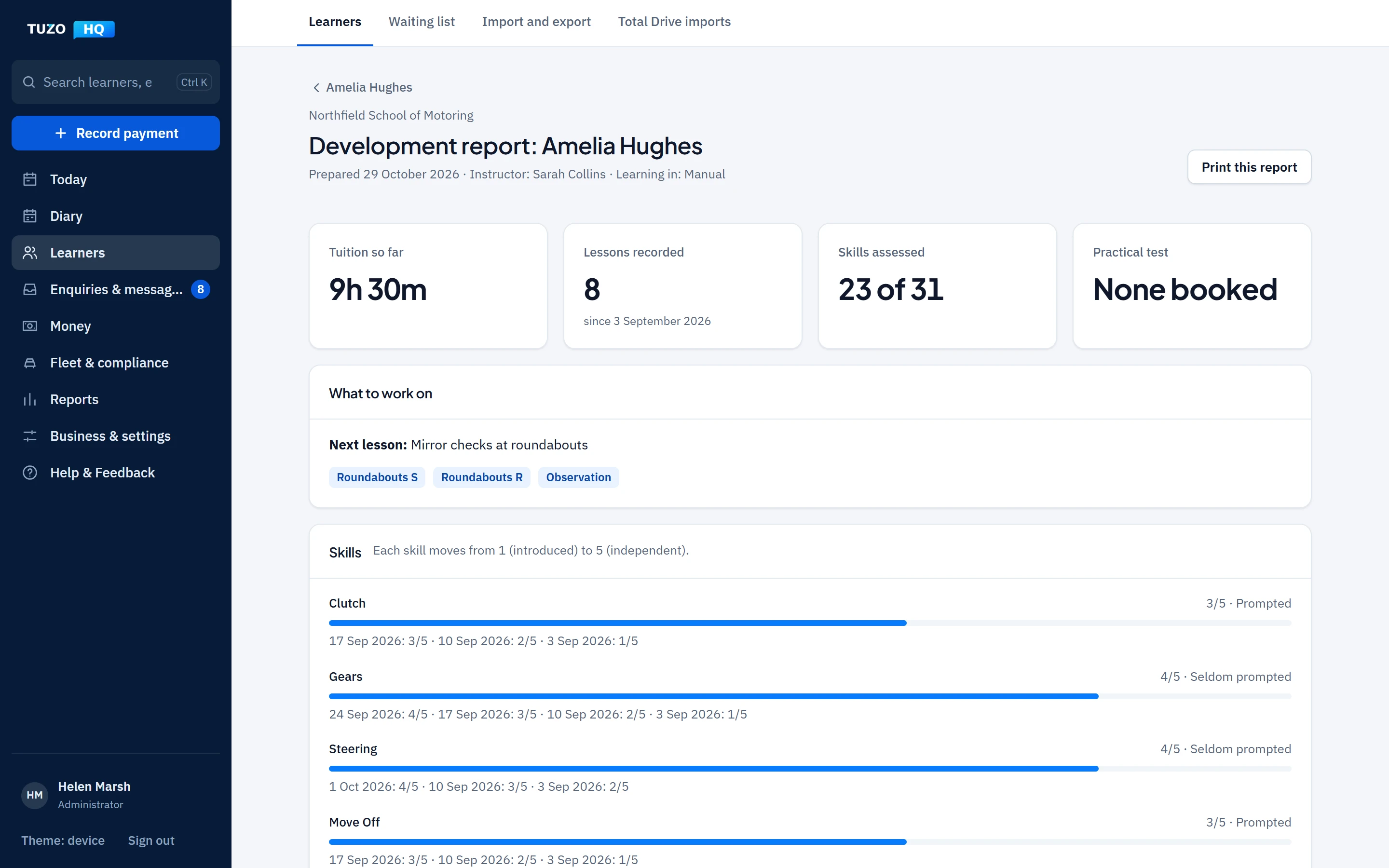
A learner’s development report in TUZO HQ: tuition so far, lessons recorded, skills assessed, what to work on next and each skill’s progress.
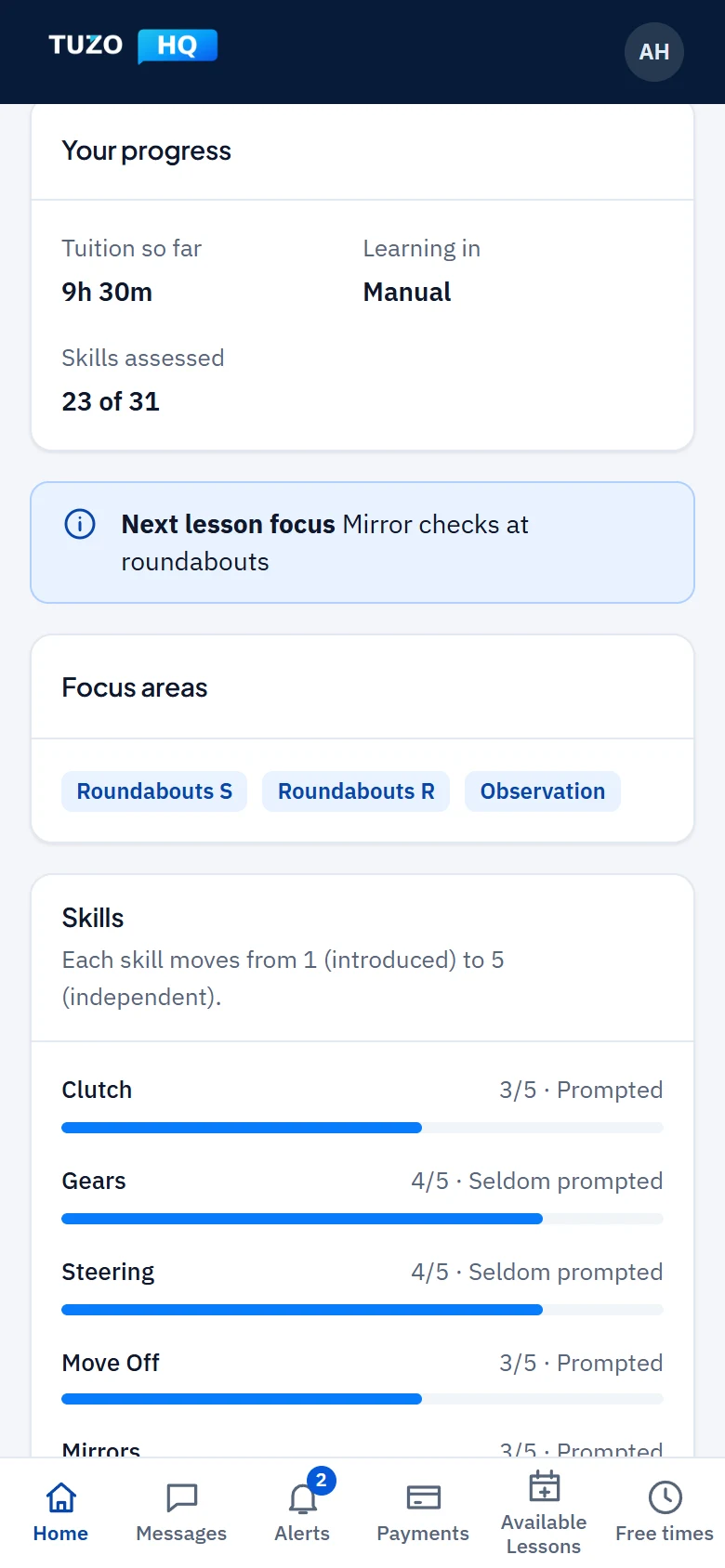
A learner’s progress on a phone: next lesson focus, focus areas and each skill’s score from 1 to 5.

Finance and payments

Know what is owed, paid and overdue

Charges are raised from lessons, payments are recorded and receipted, and balances stay up to date without a spreadsheet. Instructors keep their own earnings private, even from the school.

  • Charges, payments, receipts and balances
  • Overdue accounts and payment reminders
  • Expenses, mileage and income reports
  • Instructor pay and funded training
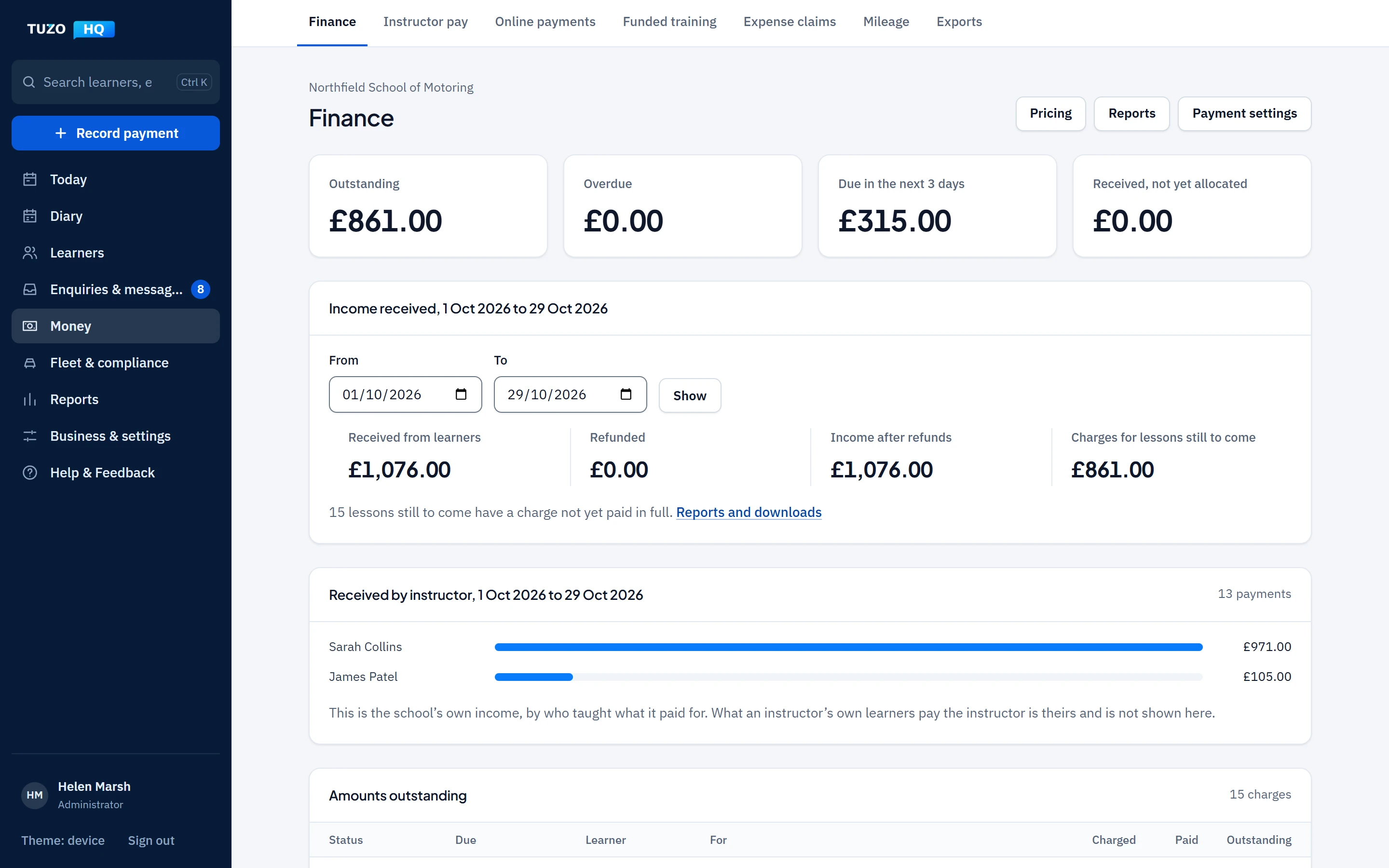
The TUZO HQ finance overview: outstanding, overdue and due amounts, income received and income by instructor.

Enquiries and CRM

Turn more enquiries into learners

Every enquiry in one list, with follow-ups that do not slip. Keep a waiting list in order, and turn an enquiry into a learner without typing their details again.

  • A form for your website and a link you can share
  • Statuses, tasks, tags and follow-up reminders
  • A waiting list in the order people enquired
  • One step from enquiry to learner
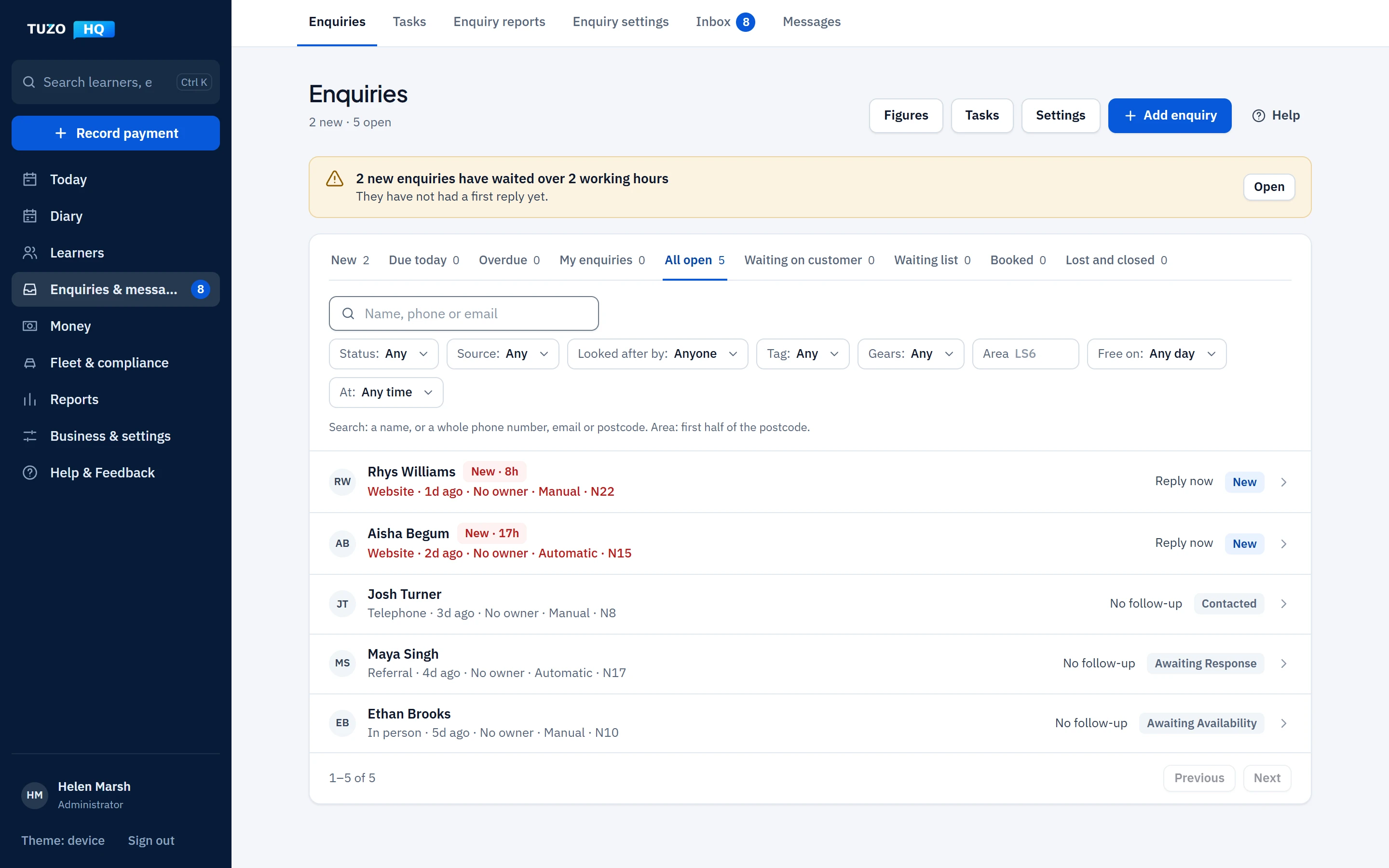
The TUZO HQ enquiries list with filters by status, source, owner and gearbox, and each enquiry’s source, age and what is missing.

Communications

Keep everyone in the loop, automatically

Message learners and parents from their record, answer learner and parent messages from One Inbox (Professional and Driving School), and let TUZO HQ send the routine notices: lesson changes, published weeks and payment reminders, by email and app notification.

  • One Inbox for learner and parent messages (Professional)
  • Two-way messages with learners and parents
  • Lesson and payment reminders by email
  • App notifications and an unread badge
  • Learners told once when a planned week is published
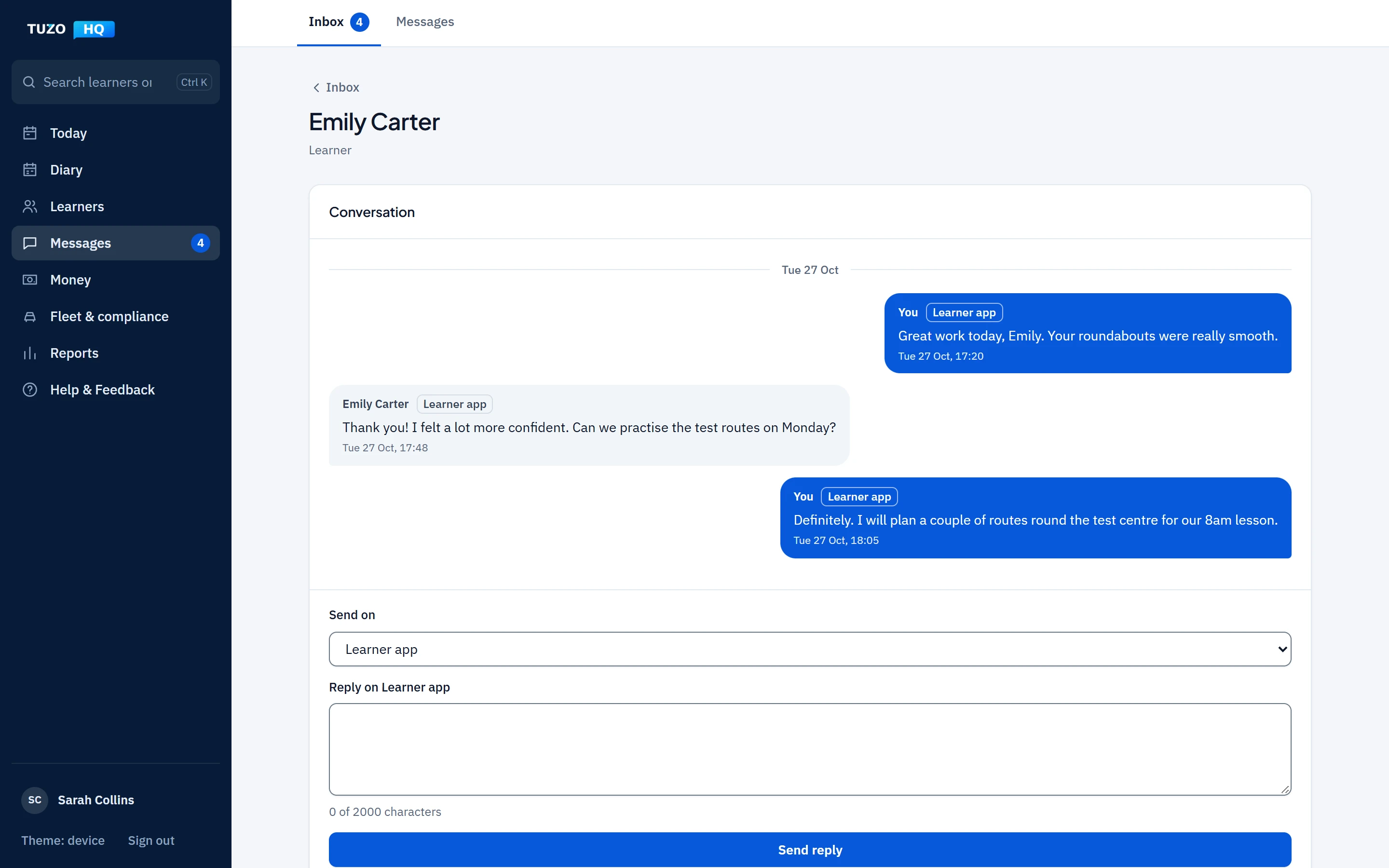
A message conversation in TUZO HQ between an instructor and a learner about practising test centre routes.

Driving school management

Run the whole school from one place

Give every member of staff exactly the access their job needs, with presets for the front desk, bookings, operations and accounts. Keep vehicles, badges and CPD in date with reminders.

  • Staff permissions with presets, ticked exactly
  • Two-step sign-in for every staff login
  • Vehicles, MOT, tax, insurance and service reminders
  • ADI and PDI badges, standards checks and CPD records
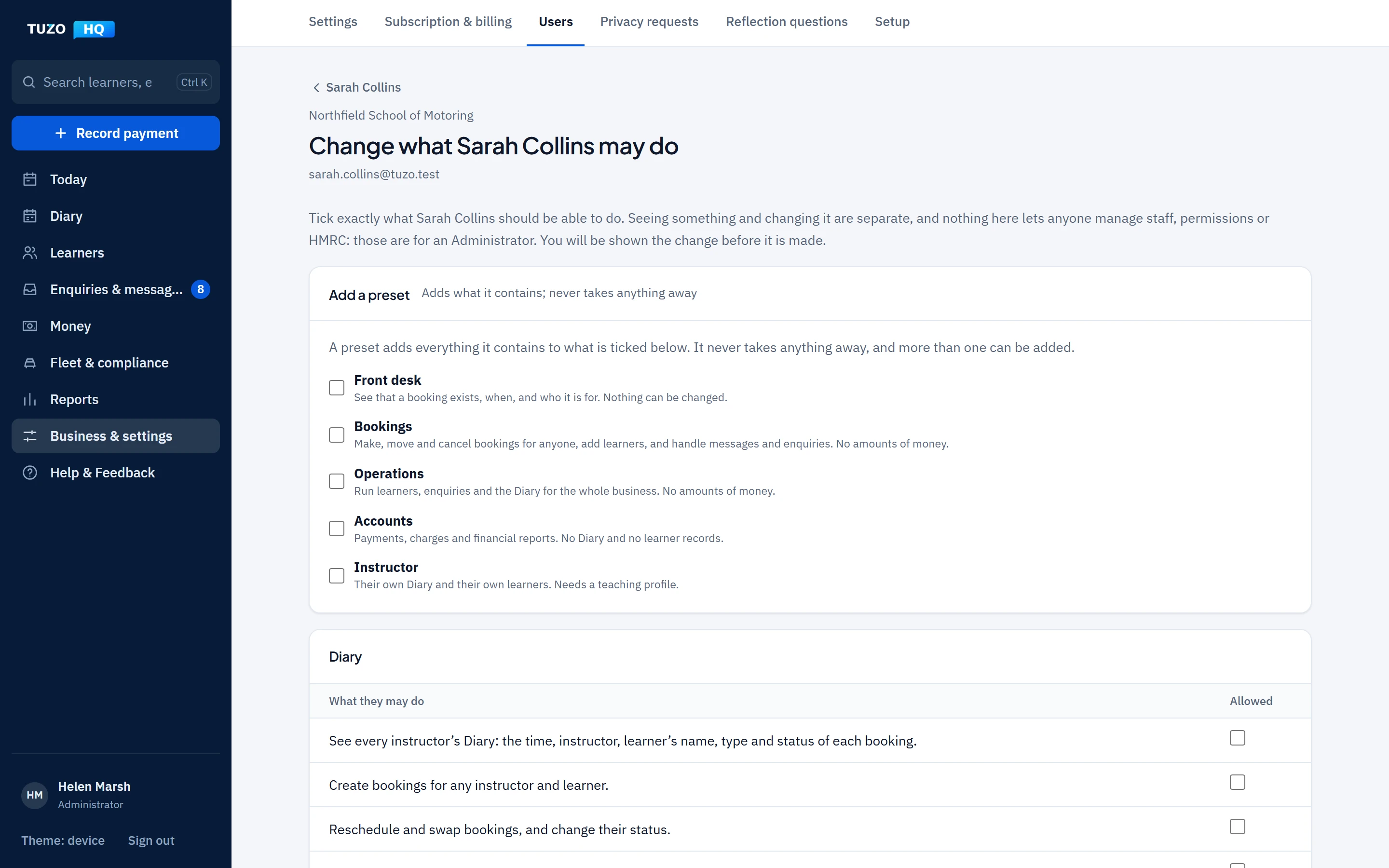
Setting what an instructor may do in TUZO HQ: presets for front desk, bookings, operations, accounts and instructor, and individual diary permissions.

Learner progress

Every lesson starts where the last one finished

Agree what to work on before the learner leaves, and it is waiting for you when the next lesson begins. No notebook, no searching through old notes.

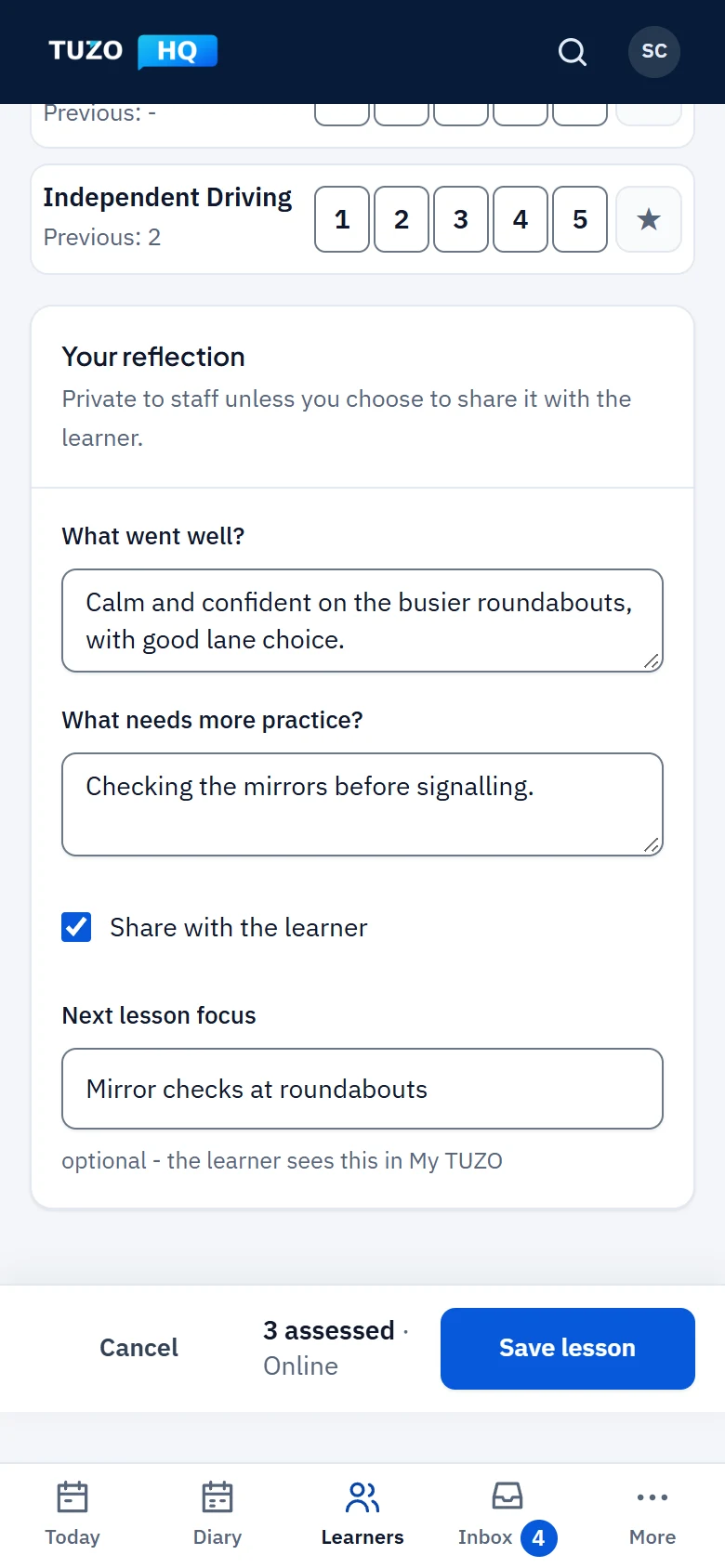
  1. The end of a lesson on an instructor’s phone: what went well, what needs more practice, and the next lesson focus.

    1End of the lesson

    Agree what comes next

    In the lesson review, note what went well and what needs more practice, star the skills to work on and write the next lesson focus together. The focus is saved to the learner’s record, and the learner sees it in their own app.

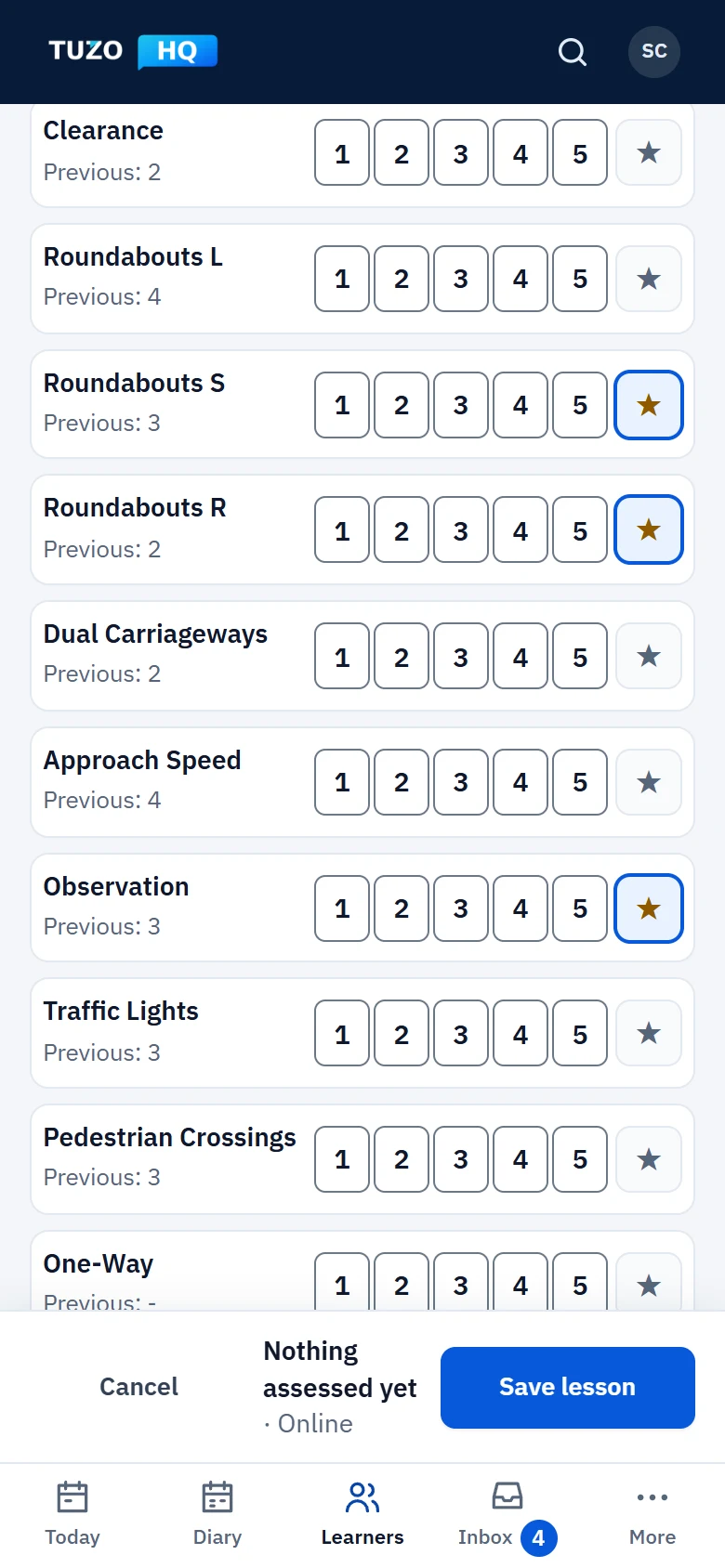
  2. The next lesson’s review on an instructor’s phone: Roundabouts S, Roundabouts R and Observation starred for focus, and each skill with its previous score.

    2Next lesson

    Open the lesson, see the plan

    The agreed focus is already there when you open the next lesson’s review: the starred skills with their previous scores, and the focus you wrote together.

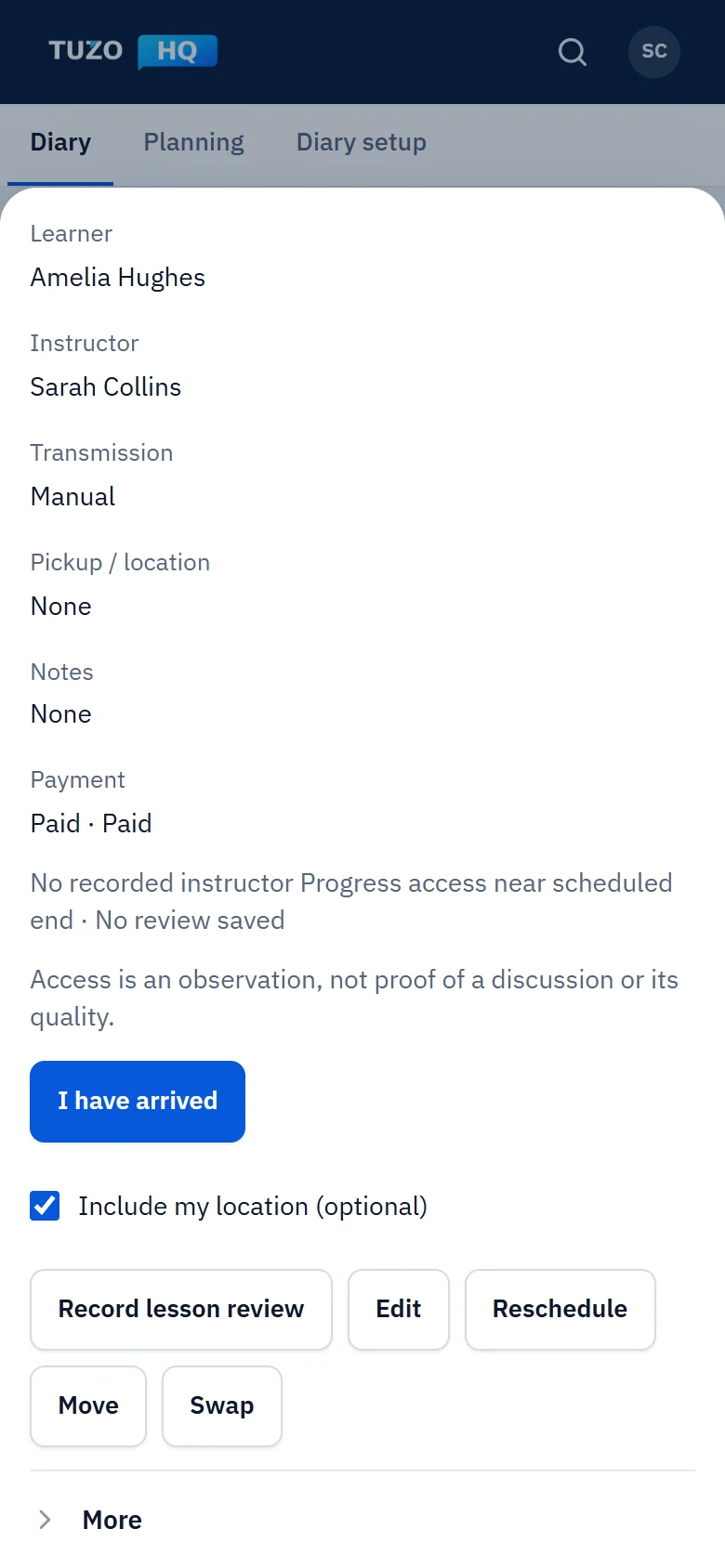
  3. A lesson on an instructor’s phone with the I have arrived button and the optional one-time location box.

    3At pickup

    Tap ARRIVED

    One tap records when you arrived. If you choose, and your phone allows it, a one-time location is attached as supporting evidence.

  4. A learner’s progress on their phone: tuition so far, the next lesson focus, focus areas and each skill’s score.

    4After the lesson

    Progress updates itself

    Score the competencies covered, add your reflections and agree the next focus. The development report and the learner’s own progress update straight away.

Every device

In your pocket, and your learners’ too

Use TUZO HQ in the browser on any phone, tablet or computer, or in the TUZO HQ app. Learners and parents see their lessons, progress, balance and messages without phoning the office.

  • Instructors: diary, learners and money between lessons
  • Learners: upcoming lessons, progress, payments and messages
  • Parents and guardians: their own sign-in, for one or several learners
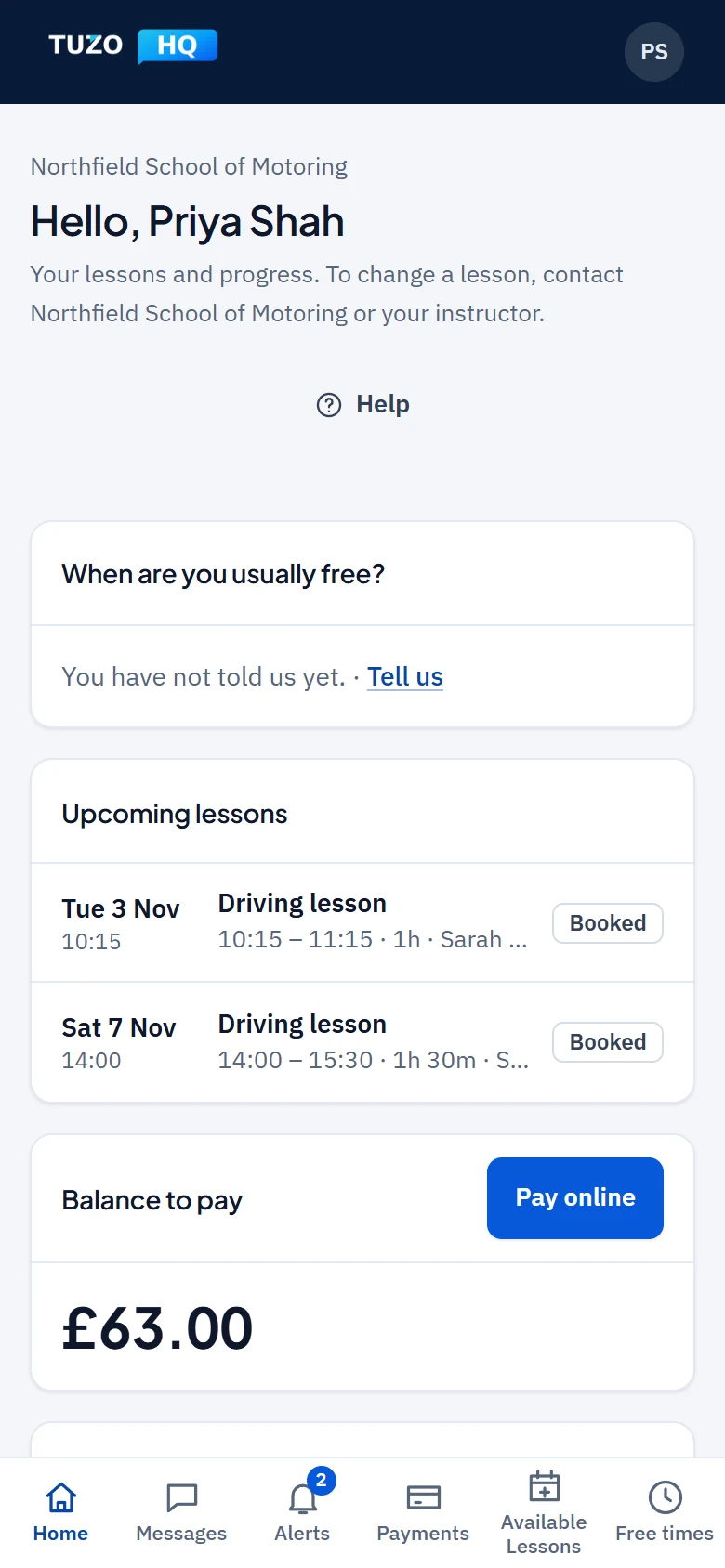
A learner’s upcoming lessons on a phone.
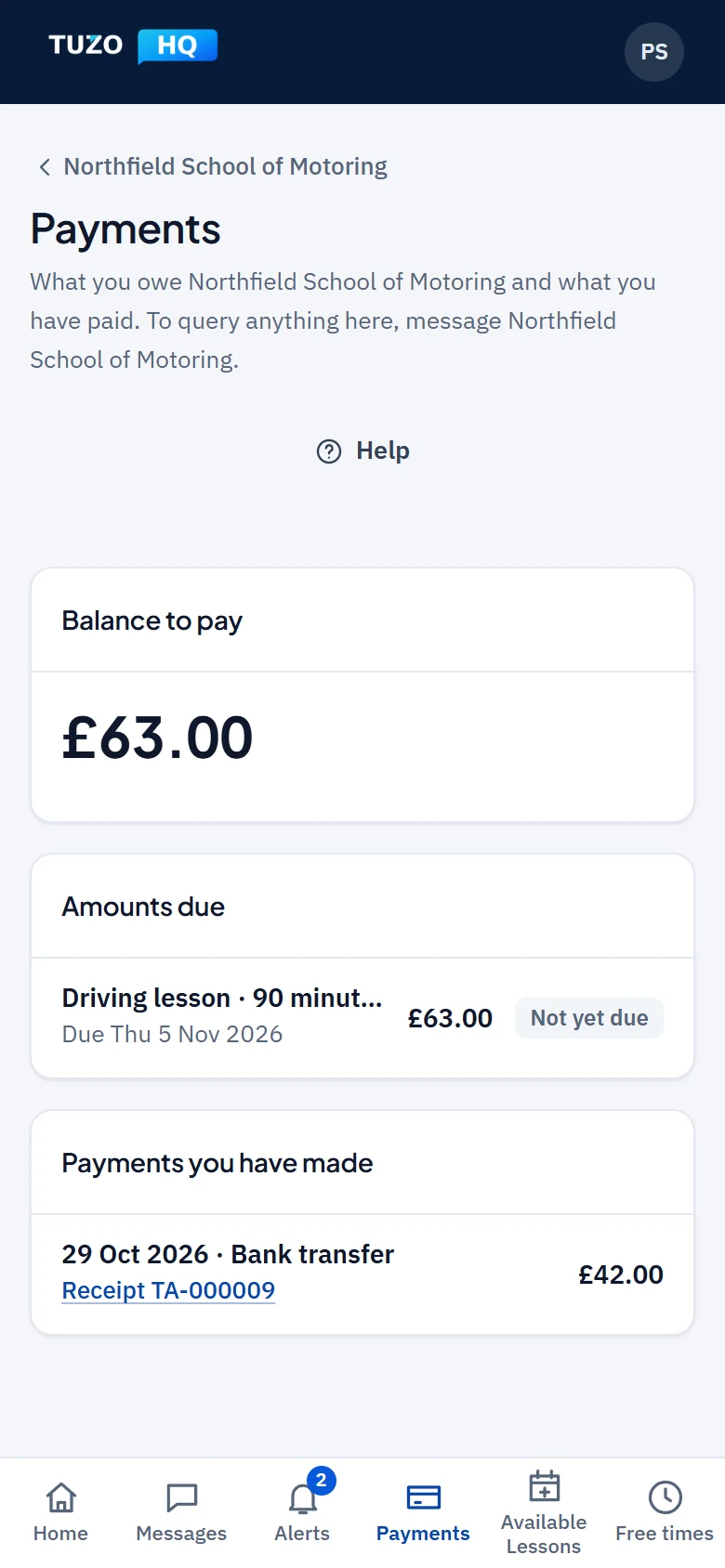
A learner’s balance and amounts due on a phone.

Security and privacy

Built for trust from day one

TUZO HQ is independent software for driving instructors and schools. Your data is yours, kept apart from every other school’s.

  • Each school’s data kept apart

    Every record belongs to one school, and the separation is enforced by the server, not just hidden on screen.

  • Access by role

    Staff see only what their permissions allow. Instructors’ own earnings stay private, even from the school.

  • Two-step sign-in

    Staff confirm each new sign-in with a code by email or an authenticator app.

  • Encrypted contact details

    Learners’ and enquirers’ contact details are stored encrypted.

  • Direct Debit through GoCardless

    Your TUZO HQ subscription is paid by Direct Debit through GoCardless. No card details are taken.

  • Built for DVSA tests

    Practical and mock tests, DL25 faults, ADI and PDI badges, standards checks and CPD.

Read the privacy policy

Pricing

Simple pricing that grows with you

Every package starts with a 60-day free trial and is paid by Direct Debit, monthly or annually.

Starter

£14.99 a month

Everything one instructor needs: diary, learners, progress, enquiries, money and TUZO QuickBook.

Includes One Inbox and smarter scheduling

Professional

£20.99 a month

Starter, plus One Inbox, suggested lesson times, a proposed week and advanced reports.

Driving School

£24.99 a month for the first instructor

+ £12.49 a month for each additional teaching instructor

Professional, plus several instructors, staff permissions, shared vehicles and school-wide reports.

SMS Credits, AI Receptionist and Automated Marketing are optional extras, never part of a package. See optional extras

Training to be an instructor? Free TUZO HQ access for PDIs until qualified. Join a driving school that uses TUZO HQ, or register your own workspace, and your trainee licence is checked before you can be allocated learners.

See full pricing and calculator

Moving from another system?

Import your learners, future bookings and opening balances from spreadsheet (CSV) files, checked and previewed before anything is saved. Tell us what your current system can export and we will tell you what can come across.

Talk to us about switching